A 2026 Guide to WhatsApp Payments for Businesses
For over a decade, WhatsApp has been the preferred platform for users in more than 190 countries worldwide.
Its widespread popularity makes it a powerful tool for businesses to connect with potential customers.
To help businesses unlock the full potential of this platform, WhatsApp introduced WhatsApp Payments—a feature that enables businesses to collect payments directly within the app.
This is especially valuable for online stores, as combining WhatsApp Payments with WhatsApp for ecommerce creates a seamless shopping experience—from discovering products to completing checkout—without customers ever needing to leave WhatsApp.
Businesses no longer have to redirect customers to external payment pages, which often lowers payment completion rates. Instead, they can send broadcasts, showcase product catalogs, and collect payments all within WhatsApp itself.
In this guide, we'll explore the benefits WhatsApp Payments offers for businesses, its key use cases, and how Yugme Boom can help you effortlessly integrate WhatsApp Payments into your business operations.
AI Generated
WhatsApp Payments for Businesses: 2026 Guide rewrite the content without changing the meaning and this content should be written like human,
Quick Overview
1. Introduction to WhatsApp Payments
2. Benefits of WhatsApp Payments
3. Practical Applications of WhatsApp Payments for Businesses
4. Exclusive Yugme Boom Features for WhatsApp Payments
5. Case Studies Featuring WhatsApp Payments
6. How to Collect Payments on WhatsApp
Previously, businesses shared payment links on WhatsApp that redirected customers to external payment pages to complete transactions. However, this method often resulted in a high drop-off rate, as users had to switch from WhatsApp to another platform, leading to longer loading times and other inconveniences.
To streamline the payment collection process, WhatsApp introduced WhatsApp Payments.
WhatsApp Payments is a feature that allows businesses to accept payments directly within WhatsApp using UPI (Gpay, Paytm, PhonePe), debit/credit cards, and net banking. This enables businesses to offer a seamless, end-to-end shopping experience entirely within the WhatsApp environment.
Imagine this: A customer visits your WhatsApp, browses your products and services through your catalog, adds desired items to their cart, and completes the payment — all without leaving WhatsApp.
That’s exactly what WhatsApp Payments facilitates — a comprehensive shopping journey right inside WhatsApp.
Interested in trying this innovative feature? Send “Try WhatsApp Payments” to +91 87780 87798 and experience WhatsApp Payments powered by Yugme Boom.
If you’ve already explored WhatsApp Payments, let’s look at the key advantages this powerful feature offers.
- Simplified Process: WhatsApp Payments allows businesses to send payment requests and reminders directly within chat conversations, eliminating the need for customers to leave the app or use external payment platforms. This reduces drop-off rates and boosts payment collection by 27%.
- Increased Customer Trust: As a widely trusted platform with millions of users, WhatsApp enhances brand credibility when payments are accepted within its familiar and secure environment.
- Robust Security: Leveraging UPI’s strong security measures, WhatsApp Payments guarantees that all transactions are encrypted and protected.
- Immediate Payment Alerts: Businesses receive real-time payment confirmations, enabling streamlined order processing and accurate record-keeping.
- Broad User Reach: With billions of users worldwide, WhatsApp provides businesses with access to a large and diverse customer base, facilitating global expansion.
- Reduced Transaction Fees: By bypassing third-party payment gateways, businesses may lower their transaction costs.
- Integrated Marketing and Payment: Powered by Yugme Boom, businesses can seamlessly send promotional offers and collect payments within the same chat, delivering a smooth and effective customer experience.
- E-commerce: Allow customers to add products to their cart and complete payments within WhatsApp, simplifying the checkout process.
- Fintech: Automate payment collection for services and associated accounts through WhatsApp.
- Online Classes & Workshops: Enable tutors and trainers to instantly receive course fees using WhatsApp Payments.
- Freelancers & Consultants: Allow professionals to request payments immediately after consultations or project completion.
- Restaurants & Takeaways: Let customers pay for their orders directly within WhatsApp, streamlining the ordering experience.
- Event Organizers: Facilitate easy collection of payments for event tickets or reservations via WhatsApp.
- Subscription Services: Send recurring payment reminders and collect subscription fees on WhatsApp, improving timely payments threefold.
- Donations: Enable NGOs and charitable organizations to seamlessly collect donations within WhatsApp using WhatsApp Payments.
With Yugeme Boom, you can not only broadcast payment messages to your entire user base but also send personalized payment requests directly through live chat or automated chatbot flows.
2. Effortlessly Monitor Payment Status and Re-engage CustomersKeep track of pending and completed payments within your campaigns and effortlessly launch retargeting campaigns for users who haven’t finalized their payments.
Our clients have seen a 23% increase in payment collections and a 35% reduction in drop-offs using this feature.
Pro Tip: Craft your messages to create a sense of urgency (FOMO) to encourage users to complete their purchases.
3. Verify Payment Status in Individual User ProfilesQuickly verify the payment status of each customer by accessing the payments section within their user profile.
4.Oversee All Payments in One Centralized DashboardView and monitor the status of all received and pending payments in one convenient, centralized dashboard for easier management.
5. How Yugme Boom Businesses Are Leveraging WhatsApp Payments to Collect PaymentsDiscover how companies using Yugme Boom have successfully integrated WhatsApp Pay for their operations.
- Delhi Transport Corporation (DTC)
eMudhra, a licensed certifying authority that issues Digital Signature Certificates (DSCs), uses the WhatsApp Pay feature to allow users to purchase DSCs directly through WhatsApp.
3. DTC Wellness ProgramMTC Wellness Program runs Click-to-WhatsApp Ads through AYugme Boom. When users click the advertisement, they are redirected to WhatsApp, where they can explore available services, select their preferred options, and proceed with the booking. With WhatsApp Payments enabled, users can complete the payment directly within WhatsApp, making the entire process quick and seamless.
To start using WhatsApp Payments through Yugme Boom, you need to be registered with Yugme Boom, have your WhatsApp Business API live, and ensure your Facebook Business Manager account is verified.
If you haven’t signed up with Yugme Boom yet, you can do so now.
After setting up and getting approval for your WhatsApp Business API account, follow these simple steps👇
Note: To connect WhatsApp Payments via Yugme Boom, you must be using either Razorpay or PayU as your payment gateway.
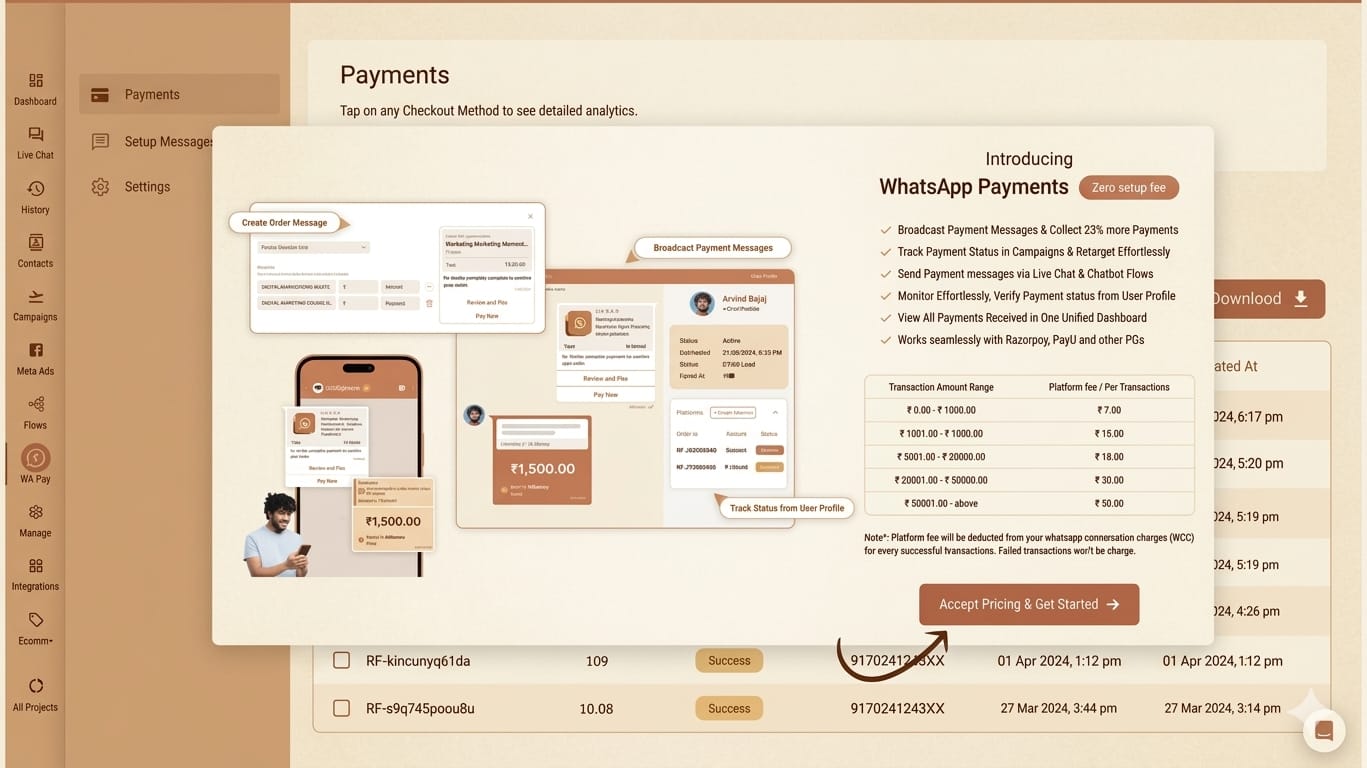
1. Navigate to the WhatsApp Payments section and tap “Accept Pricing & Get Started”Yugme Boom offers WhatsApp Payments with zero setup fees! However, there are fixed transaction charges for each payment collected through WhatsApp Payments using Yugme Boom.
You can review the platform’s transaction fees in the screenshot below.
Once you’ve reviewed the fees, simply accept the pricing to begin using WhatsApp Payments.
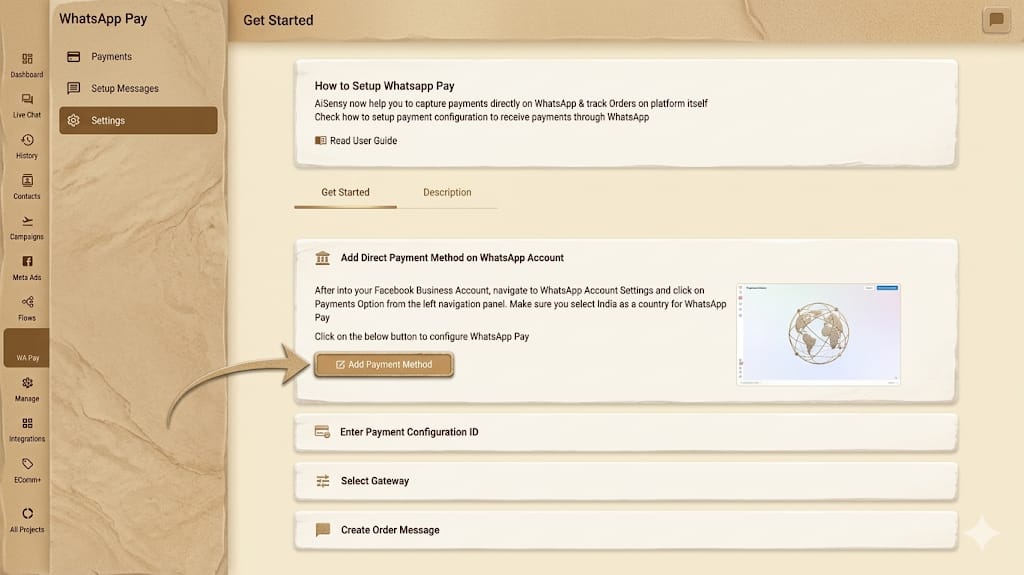
Start by navigating to the Settings section and tapping on ‘Add Payment Method.’
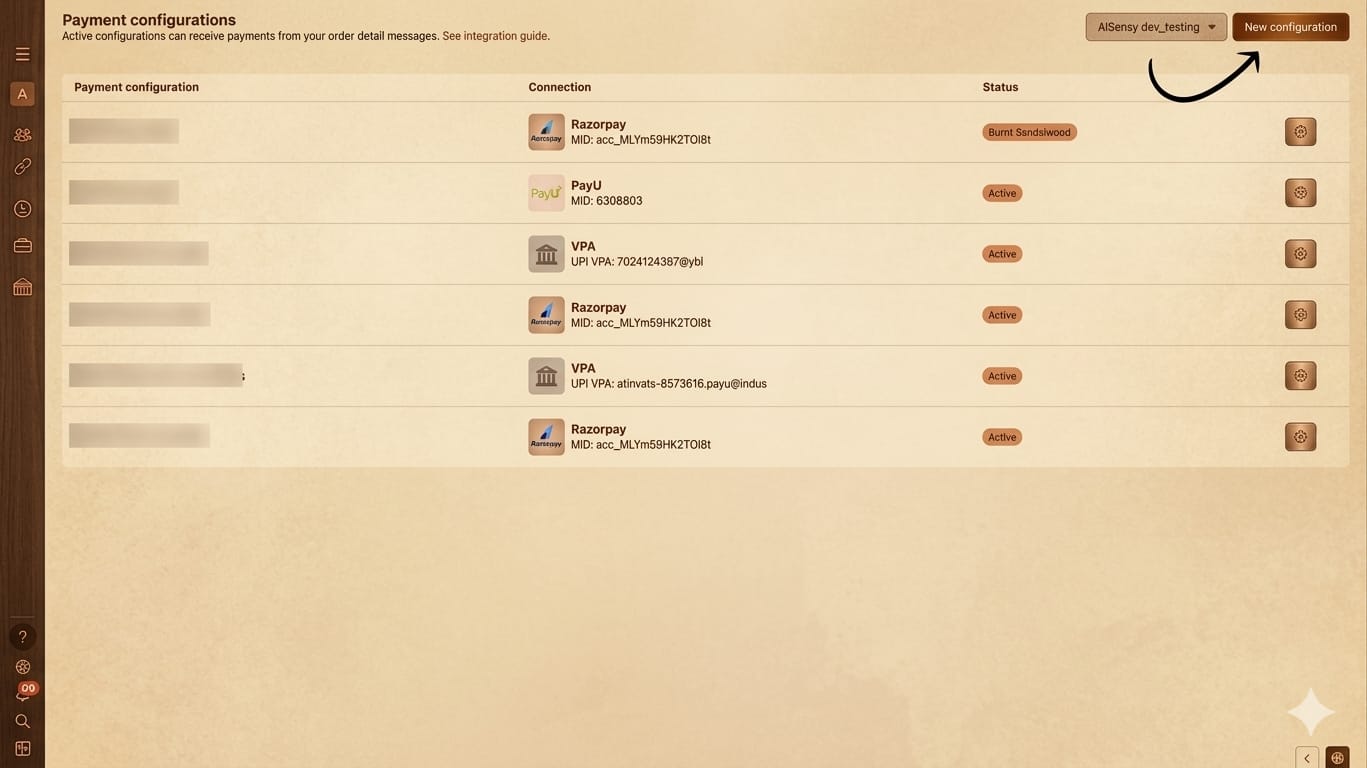
On the following screen, select ‘New Configuration’ to begin setting up your payment integration.
Select the payment gateway you currently use and want to connect with Yugme Boom, then click ‘Next.’
This gateway will be used to process payments from your customers on WhatsApp. Currently, AiSensy supports integration with Razorpay and PayU. Other gateways will be available soon.
5. Assign a Unique Name for Your WhatsApp Payment Integration and Select the Merchant Category Code (MCC)Enter any name you prefer for your Payment Configuration.
Next, input your Merchant Category Code (MCC) and Purpose Code, which you can obtain from your payment gateway provider.
After filling in the details, click ‘Next.’
Note: Make sure to use the MCC that accurately reflects your business. The example shown in the screenshot is for reference only.
6. Enter Your Meta Account Password and ConfirmProvide your Meta account password and click ‘Confirm’ to proceed.
Clicking ‘Next’ will redirect you to Razorpay’s authorization page.
8. Authorize Razorpay to Link as Your Payment Gateway for WhatsApp PaymentsIf you selected PayU instead, the authorization process will be similar.
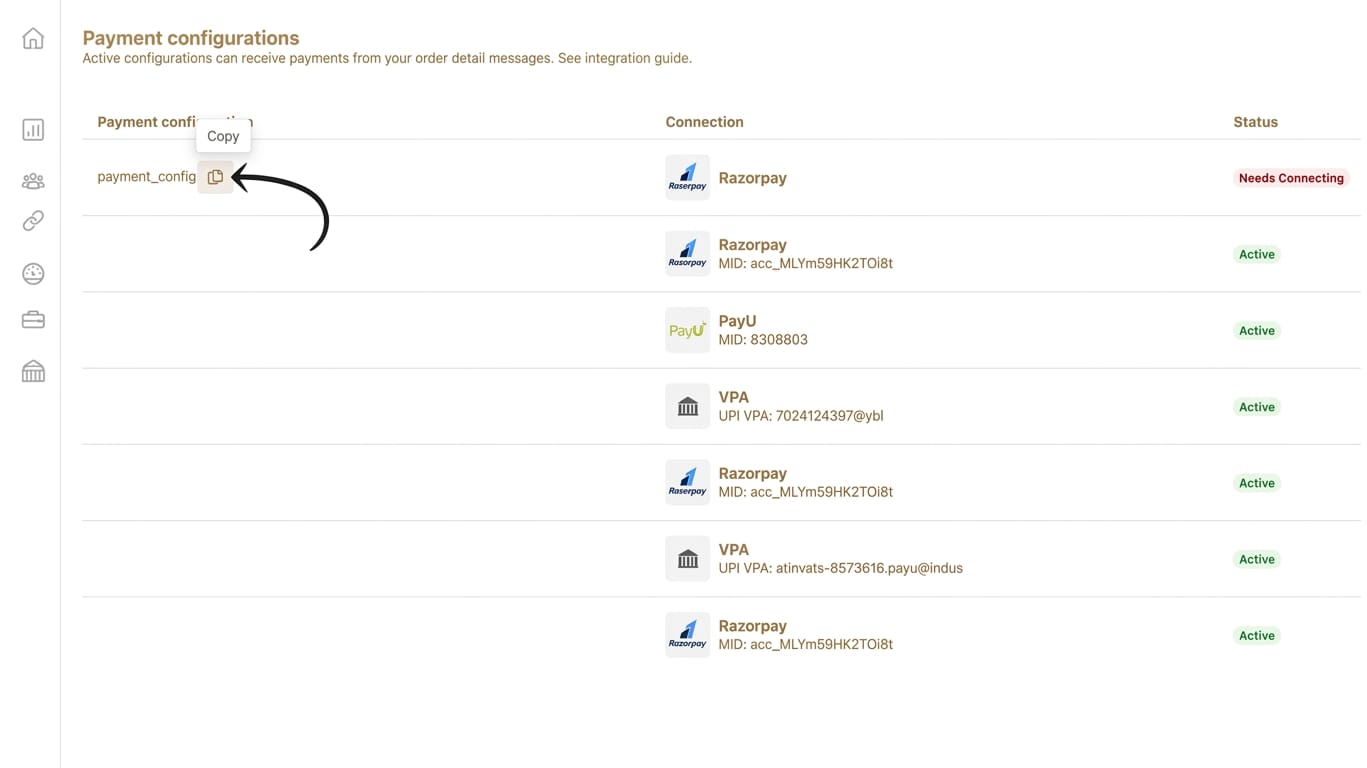
9. After Authorization, Copy the Payment ConfigurationName from Your Facebook Account
Once authorized, copy the Payment Configuration name from your Facebook account dashboard.
Follow the usual steps for creating a WhatsApp template message: add the template name, select your product type, and write the template body.
Include the tax rate you want to apply, specifying whether the price is tax-inclusive or tax-exclusive.
Tax-inclusive means no extra tax will be charged.
Tax-exclusive means tax will be added to the price.
You can also set an expiry time for the payment link in seconds (e.g., 300 seconds means the link expires after 5 minutes).
14. Add Tax DetailsIf you plan to charge tax, provide the tax rate, description (such as GST or other taxes), shipping charges (in Rupees), and any discounts (fixed amount or percentage).
Review your message carefully and then click ‘Submit.’
Before You GoFor businesses, WhatsApp Payments offers a valuable opportunity to simplify operations, improve customer experience, and accelerate growth. With Yugme textoom, this process becomes even more efficient and rewarding.
WhatsApp Payments stands out as one of the most effective ways for businesses to manage the entire customer journey within a single platform.
Common Questions About WhatsApp Payments
This section answers common questions about WhatsApp Payments, including how businesses can accept payments, supported countries, security features, and available payment methods within WhatsApp.