10 Best WhatsApp Templates for Educational Institutions (Ready to Use)
Whether you run a school, college, or online tuition platform, WhatsApp offers a powerful way to simplify communication between students and institutions. Its ease of use, real-time 1:1 chat, and support for rich media like images, videos, documents, and interactive buttons make it a more effective channel than traditional emails or SMS.
If you’re using the WhatsApp Business API, you’ll need approved template messages to initiate conversations with users. Each template is carefully reviewed by WhatsApp to ensure it meets their official guidelines.
However, these rules and formatting requirements can feel overwhelming when you’re just getting started.
In this blog, we’ll walk you through 10 practical WhatsApp template messages for educational institutions that you can use to communicate clearly, engage students, and streamline your daily operations.
Top 10 WhatsApp Template Messages for Educational Institutions

- Application Drop-Off Reminder WhatsApp Template Message
A significant number of students begin the enrollment process but leave before completing their application. This is a common challenge faced by educational institutions and online coaching centers.
You can address this by sending a timely application reminder via WhatsApp, encouraging students to return and complete their submission. With the right approach, this template can help recover 45–60% of incomplete applications.
Here’s how the application drop-off reminder notification works:
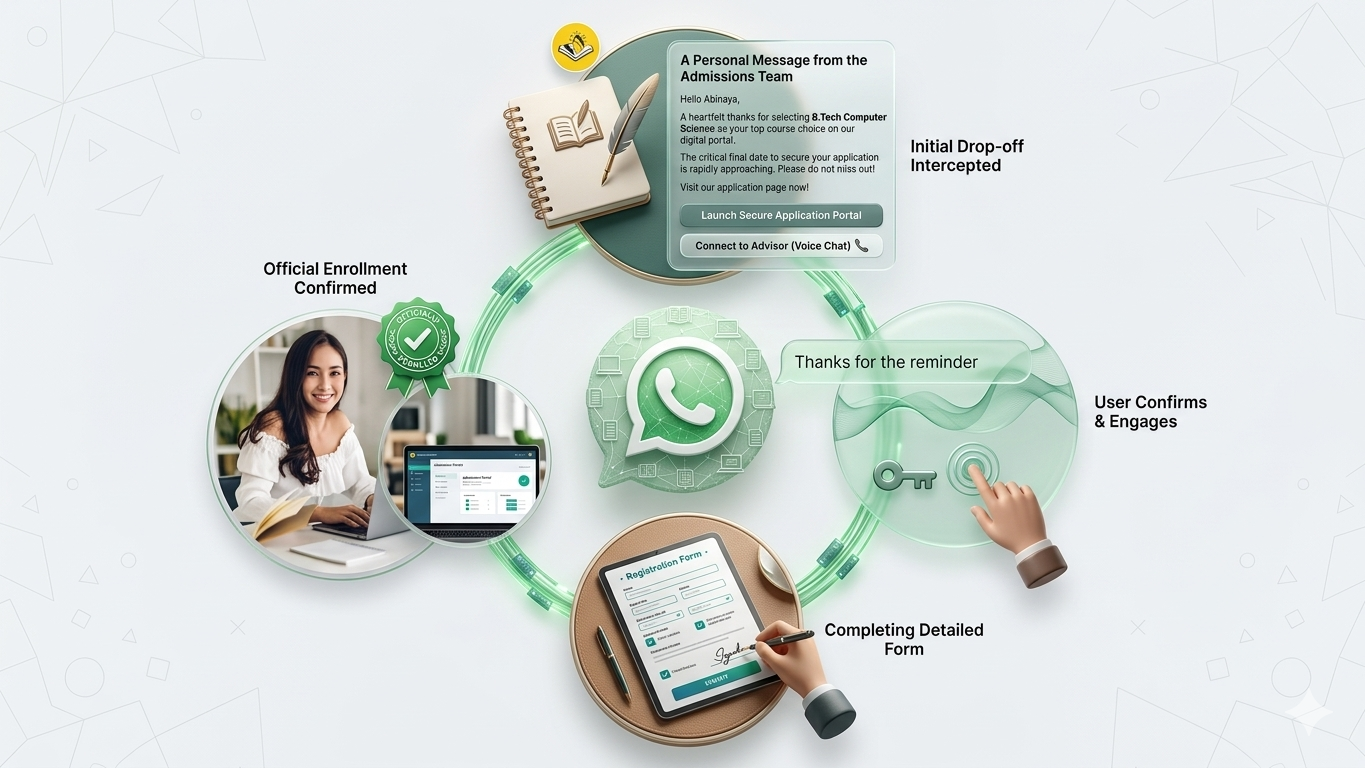
Here’s how you can structure an Application Drop-Off Reminder:
WhatsApp Template Messages for Application Reminders
Option 1:
Hi [Name],
Thank you for selecting [Course Name] on our website.
The deadline to submit your application is [Date].
Don’t miss out—complete your application using the link below, or call us if you need any assistance
CTAs:
Complete Application
Call Now
Option 2:
Hi [Name],
This is a quick reminder to complete your application for [Course Name] before [Date].
Please note that applications submitted after the deadline will not be accepted for the fall semester. Kindly complete your application at the earliest.
CTA – Complete Application
Institutions like NMIMS and SI-UK have achieved 25–60% conversion on drop-offs using WhatsApp reminders. Automating these notifications can significantly improve your enrollment rates.
2. WhatsApp Template for Sharing Course DetailsLooking to increase course enrollments through WhatsApp?
Send detailed course information to users who have already shown interest—such as those who filled out an inquiry form. Sharing relevant details at the right time improves the chances of conversion and encourages students to apply.
WhatsApp Template Message for Course Information
Hi [Name],
Thank you for choosing [Course Name] as your preferred course on our website. Here are the details:
Fees: [Fees]
Eligibility: [Eligibility]
Important Dates: [Date]
You can complete your application using the link below. For any queries, feel free to reach out to us.
CTA – Complete Application
3. WhatsApp Templates for Registration & Enrollment ConfirmationKeep students informed by sending confirmation messages once their registration or enrollment is successful. These messages reassure students and clearly communicate the next steps.
WhatsApp Template Messages for Enrollment Confirmation
Option 1:
Dear [Name],
Welcome to [Institute Name].
Your enrollment for the [Course Name] course has been successfully confirmed.
Regards,
[Institute Name]
Option 2:
Congratulations [Name] on your acceptance to [Institute Name]!
We look forward to welcoming you this fall.
Option 3:
Hi [Name],
Your admission for [Course Name & Batch] has been confirmed.
Please collect your books from the admin office before [Date].
If you need any assistance, use the option below
Quick Reply – I Need Assistance
4. WhatsApp Template for Attendance UpdatesSharing attendance updates regularly—weekly or monthly—helps students stay informed and accountable. WhatsApp ensures these updates are delivered quickly and efficiently.
WhatsApp Template Messages for Attendance Reports
Option 1:
Dear [Student Name],
Your attendance for the month of [Month] is [Attendance %].
Total Classes: [Number]
Present: [Number]
Absent: [Number]
Regards,
[Institute Name]
If a student’s attendance falls below the required threshold, you can send a reminder like this:
Option 2:
Dear [Name],
Your current attendance is [Attendance %], while the minimum required attendance is [Required Attendance %].
Please ensure you meet the attendance requirement to remain eligible for final exams.
Regards,
[Institute Name]
5. WhatsApp Template for Fee Payment RemindersSending fee reminders 3–5 days before the due date helps ensure timely payments and reduces delays.
WhatsApp Template Messages for Fee Payment Reminders:
Option 1 (Before Due Date):
Dear [Parent’s Name],
This is a reminder that a fee of [Fee Amount] for the month of [Month] is due by [Due Date].
Kindly make the payment before the due date to avoid any additional charges.
Please ignore this message if the payment has already been made.
Regards,
[Institute Name]
Option 2 (After Due Date):
Hi [Student Name],
This is to inform you that your college fee of [Fee Amount] is now overdue.
A late fee of [Late Fee Amount] will be applied daily until the payment is completed.
We request you to clear the dues at the earliest to avoid additional charges.
Option 3 (Payment Confirmation):
Dear [Student Name],
Your fee payment for [Semester] amounting to [Amount] has been successfully received on [Date].
Regards,
[Institute Name]
6. WhatsApp Template for Event UpdatesMany students miss out on events simply due to lack of awareness. Regular WhatsApp updates can significantly improve participation in school and college activities.
WhatsApp Template Messages for Event Notifications:
Option 1 (Student Event Invite):
Dear [Student Name],
We’re excited to announce that this year’s [Event Name] will be held on [Day/Days].
Participation is free, and you’re invited to join a variety of engaging activities.
Confirm your participation by filling out the form below
CTA – Fill Form
Option 2 (Parent Notification – Picnic/Event):
Dear [Parent Name],
We are organizing a picnic for students of grades [Classes] to [Location] on [Date & Time].
The participation fee is [Amount].
Kindly complete the payment before [Date] to confirm your child’s participation.
You can pay in cash or online using the link below
CTA – Pay Now
7. WhatsApp Template for Class ReschedulingMost WhatsApp messages are opened within the first hour, making it an effective channel for urgent updates like schedule changes. Inform students at least 3–4 hours in advance.
WhatsApp Template Message for Class Rescheduling:
Dear [Student Name],
Your [Subject Name] class has been rescheduled and will now take place on [Date].
Regards,
[Institute Name]
8. WhatsApp Template for Admission OpeningsInstead of relying only on offline announcements, use WhatsApp to reach a wider audience and attract more applications.
WhatsApp Template Messages for Admission Announcements:
Option 1 (General Admission Announcement):
Dear [Parent’s Name],
Admissions are now open for the academic year [Academic Year] at [Institute Name].
We encourage you to confirm your ward’s admission at the earliest.
Regards,
[Institute Name]
CTA Button – Fill Form
Option 2 (Post Inquiry Follow-Up):
Dear [Parent’s Name],
Thank you for your admission inquiry at [Institute Name].
Our team will connect with you shortly to assist with all admission-related queries.
Regards,
[Institute Name]
9. WhatsApp Template for Results AnnouncementInstead of relying on informal communication, share official result announcements directly via WhatsApp for better clarity and reach.
WhatsApp Template Message for Results:
Dear [Student Name],
Results for [Class Name] are now available.
Click the button below to view your grades.
Wishing you all the best!
CTA – Check Result
- WhatsApp Template for Holiday Announcements
Quickly inform students and parents about unexpected or scheduled holidays using WhatsApp.
WhatsApp Template Message for Holiday Notice:
Dear [Parent/Student Name],
[Institute Name] will remain closed on [Date] due to [Reason].
Regular classes will resume on [Next Working Date].
Regards,
Admin Office
Every WhatsApp template message is reviewed to ensure it complies with official WhatsApp guidelines. Keeping a few essential points in mind can help you get your templates approved quickly and improve their effectiveness.
Here are the key points to remember:
- Use formatting options like Bold, Italics, and ~Strikethrough~, along with emojis, to make messages more engaging.
- Ensure the message formatting is accurate, as incorrect formatting may lead to rejection.
- Include Call-to-Action (CTA) or Quick Reply buttons, keeping the text within the 20-character limit.
- Use emojis thoughtfully to add a personal and friendly touch to your messages.
To send WhatsApp Template Messages, you need a reliable WhatsApp Business API partner such as Yugme Boom.
Yugme Boom is a WhatsApp Business API-based marketing platform that enables you to create and send broadcast messages to a large audience with ease. You can quickly design and send WhatsApp template messages to unlimited users in just a few clicks.
Keep in mind that these messages can only be sent to users who have opted in to receive WhatsApp communications from your business.
With Yugme Boom, you can also:
- Send promotional WhatsApp messages to drive sales
- Automate transactional notifications with secure end-to-end encryption
- Respond to customer queries through 1:1 live chat
- Run retargeting campaigns for specific audience segments