A Complete Guide for Businesses on Sending OTP Messages via WhatsApp
One-Time Passwords (OTPs) play a vital role in securing customer authentication. From signing into accounts to authorizing high-value transactions, OTPs help businesses combat fraud and create safer digital experiences. Now, with WhatsApp supporting OTP delivery through the WhatsApp Business API, companies can send quick, dependable, and highly engaging authentication messages straight to users' phones. This guide will walk you through how to send OTPs via WhatsApp, explain why it’s a better option than SMS, and show you how to get started with Yugme Boom.
Quick Overview
1. What Exactly Is an OTP Message on WhatsApp?
2. Why Choose WhatsApp Over SMS for Sending OTPs?
3. How OTP Delivery Works Through the WhatsApp Business API
4. Step-by-Step Guide to Sending OTPs on WhatsApp Using Yugme boom
5. Tips for Creating Effective WhatsApp OTP Messages
6. Examples of WhatsApp OTP Message Templates
7. Conclusion
8. Common Questions Regarding WhatsApp OTP
An OTP (One-Time Password) is a unique, time-limited code sent to a user to confirm their identity during actions like logging in, registering an account, resetting a password, confirming payments, or enabling two-factor authentication (2FA). When sent via WhatsApp, these OTPs arrive more quickly than traditional SMS and are delivered within a trusted, highly engaging messaging app.
Many businesses worldwide are making the switch from SMS to WhatsApp for OTP delivery because of several key benefits:
- Higher delivery success
- Faster delivery speed
- More cost-effective at scale
- Enhanced, branded experience
To send OTP messages via WhatsApp, businesses must use the WhatsApp Business API. Unlike the standard WhatsApp Business App, the API offers:
- Automated delivery of OTPs
- Seamless integration with your website or mobile app
- The ability to use pre-approved message templates
Sending OTP messages on WhatsApp is easy with Yugme BoomAuthentication Templates and API automation. You can create secure, pre-approved OTP templates and set them to send automatically from your website or app in just a few simple steps.
Here’s a straightforward guide to help you set up WhatsApp OTP messages using Yugme Boom:
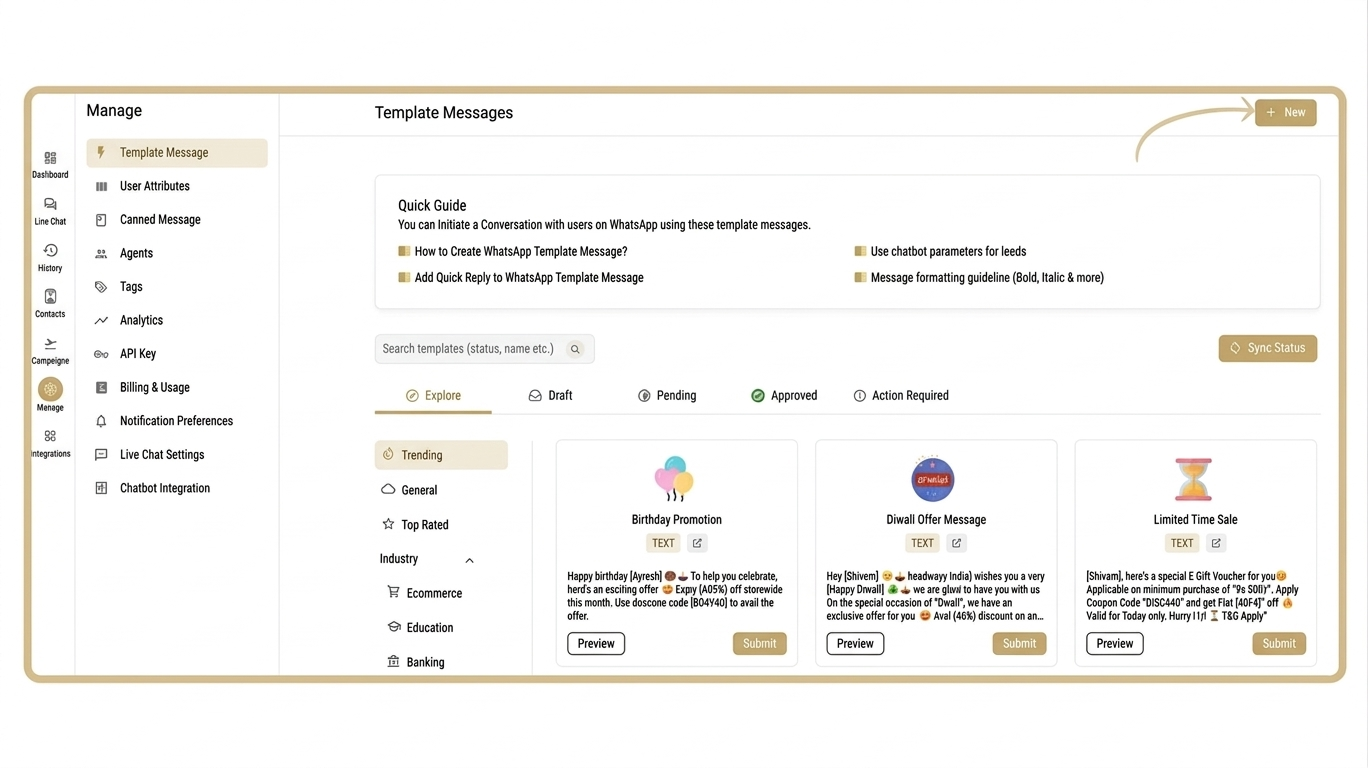
Step 1: Create an Authentication Template in Yugme Boom
- Log in to the AiSensy dashboard and go to Manage → Template Message
- Click + New to create a new template
- Choose Authentication under Template Category
- Select Text as the Template Type
- Pick your preferred template language
- Enter a template name (use lowercase letters and numbers only, no spaces or special characters)
- Add a sample OTP code (for approval purposes only, not the actual code)
- Optionally, include an OTP expiration notice and a brief security message reminding users not to share their code
- In the Interactive Actions section, enter your sample code under Copy Code
- Submit the template for approval
Step 2: Set Up an API Campaign for OTP Automation
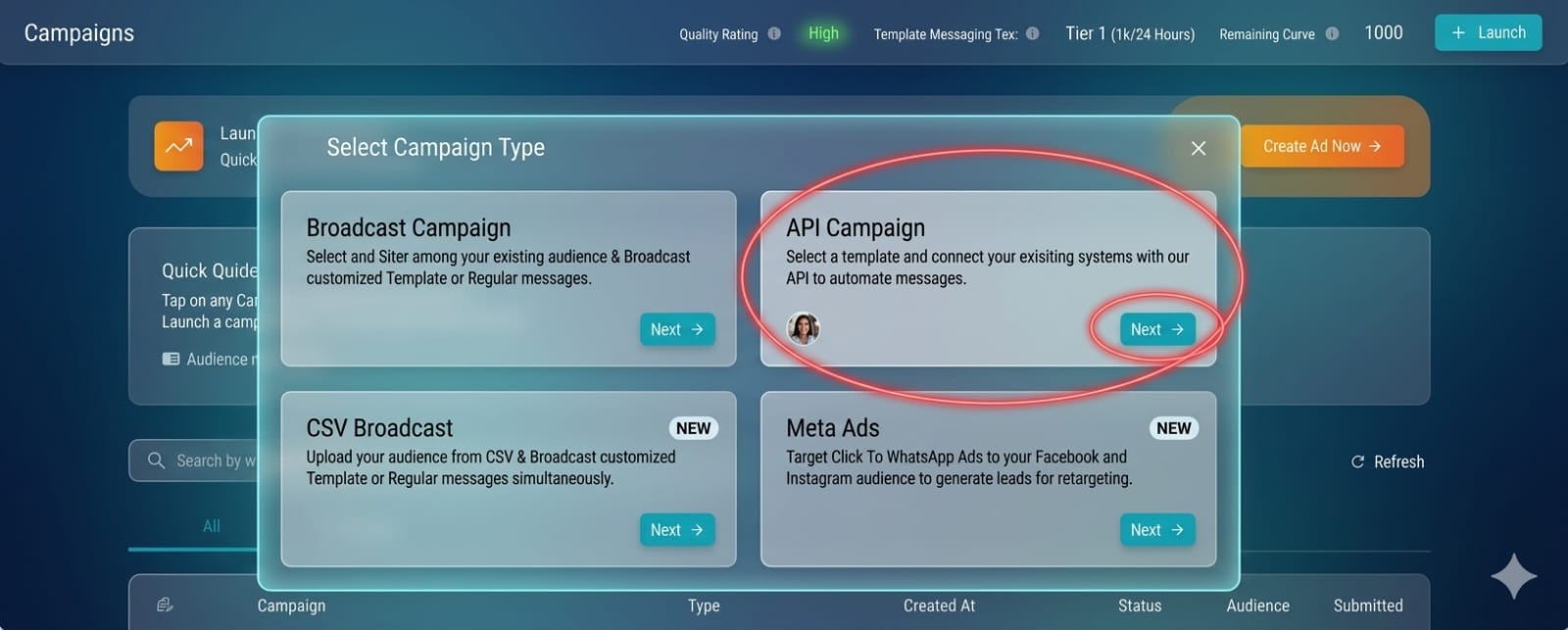
- After your template is approved, head to Campaigns → + Launch → select API Campaign
- Give your campaign a name
- Choose your approved authentication template
- Activate the campaign by setting it live
Step 3: Test Your WhatsApp OTP Campaign
- Before launching for real, test the OTP flow to make sure everything works correctly:
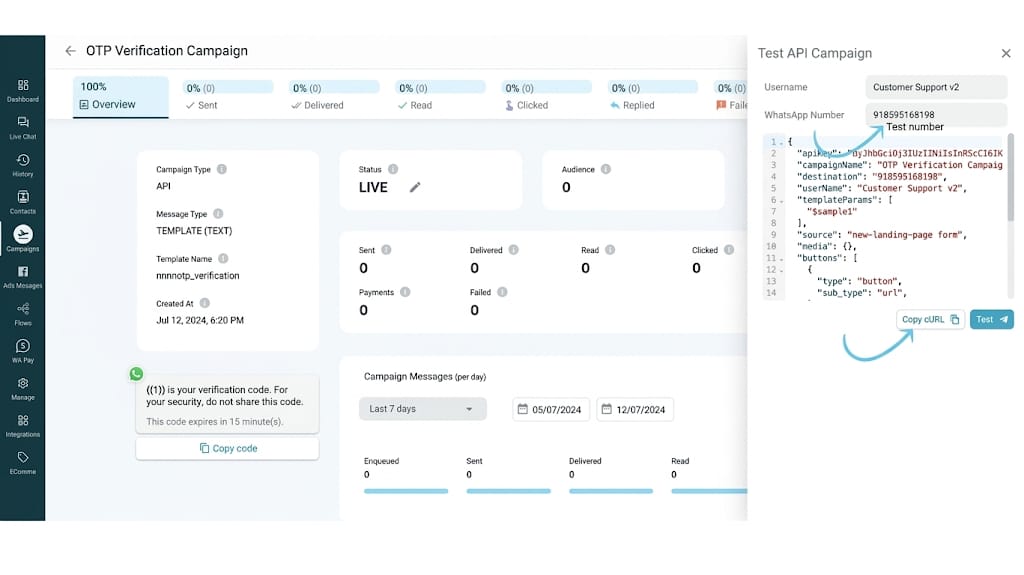
- Open your campaign and click Test Campaign
- In the script, find the templateParams array and insert your sample OTP code between the quotation marks
- In the button parameters section, enter the same OTP code again
- Save your changes
Step 4: Connect the cURL to Your Backend
- Copy the generated cURL code
- Paste it into your backend system where OTPs are triggered (such as during login, signup, or payment processes)
- Map user information like mobile numbers and usernames dynamically so each user receives a unique OTP on their WhatsApp
- Test it first with your own WhatsApp number before going fully live
To ensure both security and a smooth user experience, keep these best practices in mind:
- Use short OTP codes, typically 4 to 6 digits
- Set expiration times, usually between 5 and 10 minutes
- Always include a clear warning advising users not to share their code
- Incorporate clear branding within the message
- Implement retry limits and rate-limiting to prevent abuse
Here are some ready-made templates you can customize:
Login OTP "Your login code for {{Business Name}} is {{1}}. It’s valid for {{2}} minutes. Please don’t share it with anyone." Transaction OTP "To complete your transaction, please enter this verification code: {{1}}. The code will expire in {{2}} minutes." Password Reset OTP "Use code {{1}} to reset your password. This code is valid for {{2}} minutes. If you didn’t request this, simply ignore the message."With Yugme Boom, sending OTP messages on WhatsApp and automating the entire verification process is quick and easy. Create a free Yugme Boom account today and start delivering secure, instant OTPs that your customers already know and trust.
Common Questions Regarding WhatsApp OTP
This section answers common questions about WhatsApp OTPs, including how they work, their security benefits, and how businesses can send and automate OTP messages using the WhatsApp Business API. It also explains global delivery, validity periods, and cost considerations.