A Comprehensive Guide to WhatsApp Webhooks (Designed for Non-Developers)
If you’re curious about what WhatsApp Webhooks are and how they can be used without any coding knowledge, this guide is designed for you.
It provides a clear and practical overview of WhatsApp Webhooks, explaining their purpose, how they function, and how you can implement them through platforms like Yygme Boom — all in simple, easy-to-understand language.
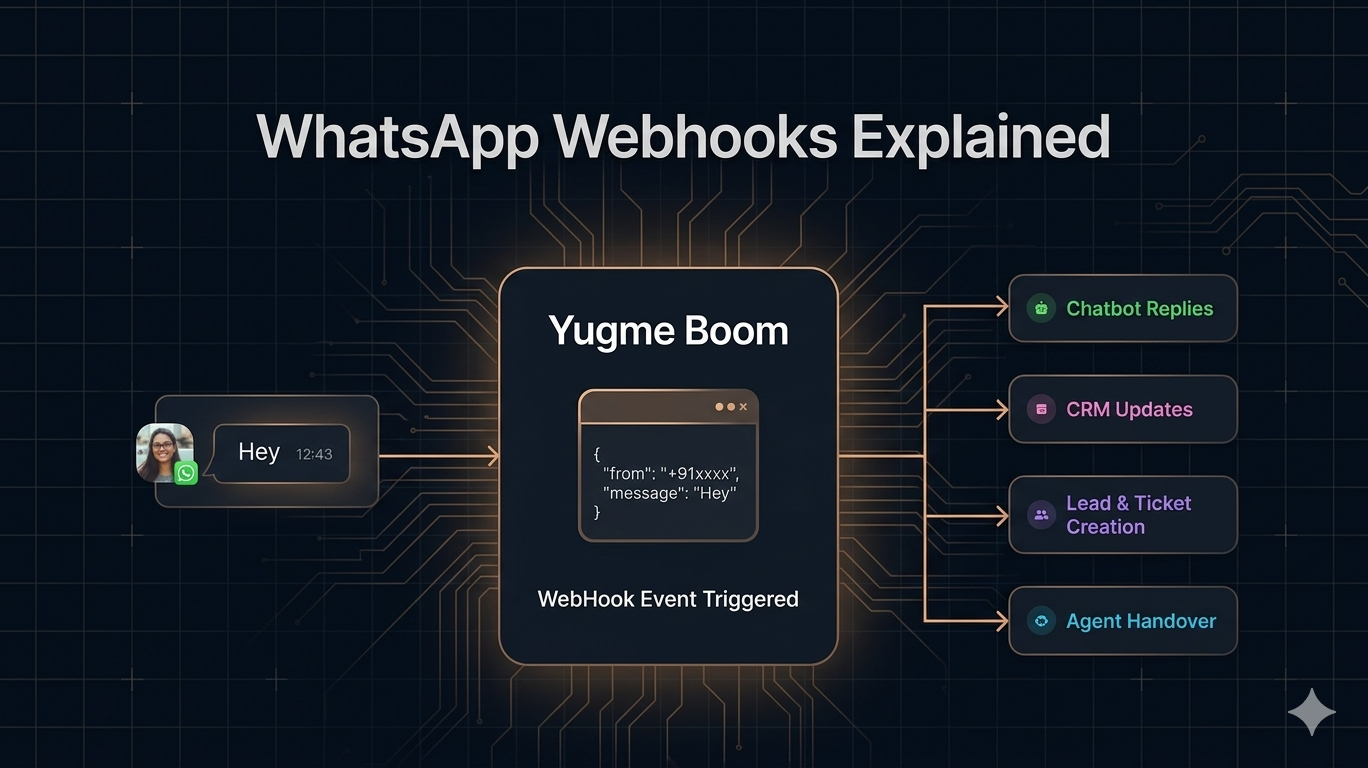
At a Glance
1. Understanding WhatsApp Webhooks: Real-Time Automated Notifications
2. Why WhatsApp Webhooks Are Crucial for Efficient Business Operations
3. Understanding the Difference: WhatsApp Business API Webhook vs. WhatsApp Webhook
4. How WhatsApp Webhooks Work: An Easy Explanation for Non-Developers
5. Common Events Delivered Through WhatsApp Webhooks
6. Practical Uses of WhatsApp Webhooks for Business Efficiency Automated Customer Support
7. Setting Up WhatsApp Webhooks: A Simple Guide for Non-Technical Users
8. Understanding Common WhatsApp Webhook Payload Fields Made Simple
9. Troubleshooting Common WhatsApp Webhook Issues Webhook Not Activating
10. Integrating WhatsApp Webhooks with Business Applications
11. Conclusion: Unlocking the Power of WhatsApp Webhooks
12. Common Questions Regarding WhatsApp Webhooks
WhatsApp Webhooks are automated alerts that your system receives whenever specific events occur within WhatsApp Business. For example, when a customer sends a message to your business, a webhook instantly notifies your server about the event. This eliminates the need for you to constantly check for updates, as the information is delivered to you automatically.
Technically, a webhook is a user-defined HTTP callback, which means WhatsApp sends data to a URL (web address) that you specify each time a trigger event happens. Essentially, webhooks serve as automatic event notifications that provide real-time data, allowing you to receive updates without manually polling or querying the WhatsApp APIs.
In the absence of webhooks, your application or CRM would be unaware of user interactions on your WhatsApp channel as they happen. This would force you to manually check for updates, a process that is both time-consuming and inefficient.
Webhooks enable crucial business capabilities such as:
- Immediate notifications for incoming messages
- Tracking of message delivery and read confirmations
- Automated chatbot interactions
- Real-time updates to your CRM system
- Comprehensive analytics and reporting
- Efficient customer support processes in real time
Whether you are executing lead generation initiatives or managing large-scale customer support, WhatsApp Webhooks allow seamless automation by eliminating the need for developers to continuously query the API.
The term "WhatsApp Business API Webhook" refers specifically to the webhook integrated with the WhatsApp Business API, which serves as the official platform for enterprise-level communication.
In essence:- WhatsApp Webhooks: General webhooks that handle WhatsApp event notifications
- WhatsApp Business API Webhooks: Webhooks designed specifically for businesses leveraging the official WhatsApp Business API
While both types provide real-time event updates, the WhatsApp Business API Webhook is customized for organizations using the official business API, supporting advanced features such as message templates, session-based messaging, and structured notifications.
To understand WhatsApp Webhooks, think of WhatsApp as a mailroom where messages arrive regularly. Without webhooks, you would need to keep checking the mailroom frequently to see if new messages have come in—similar to how APIs work without webhooks. With webhooks, however, WhatsApp notifies you immediately when a new message arrives, much like a doorbell ringing to alert you.
Here’s a straightforward overview of the process:
- A user sends a message to your WhatsApp number.
- WhatsApp detects this activity and generates an event.
- The WhatsApp Webhook sends a notification to the URL you have set up.
- Your application or tool (such as AiSensy, CRM, or chatbot) receives the information.
- Your system responds accordingly—sending a reply, updating contact details, or initiating an automation.
- This eliminates the need for constant checking, ensuring you receive updates instantly and can act on them promptly.
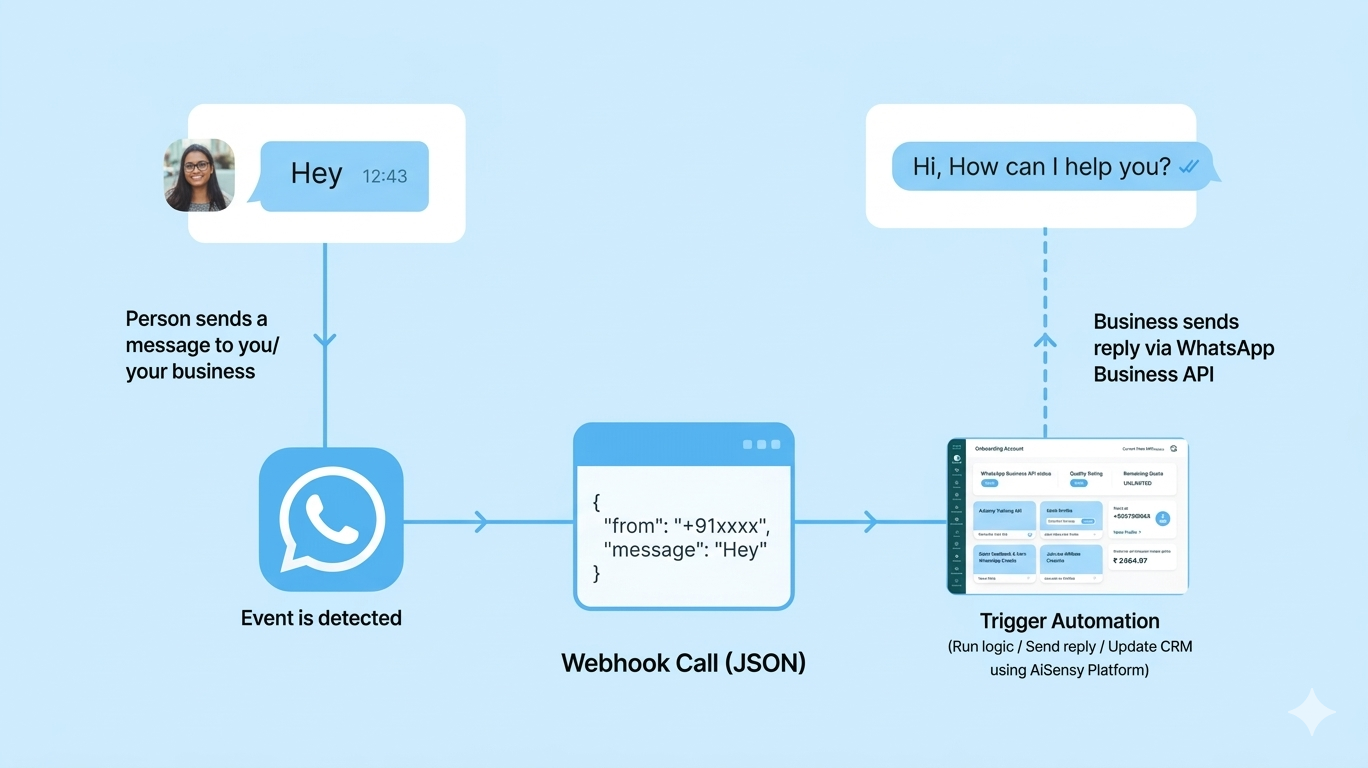
WhatsApp Webhooks can notify your system about various key events, including:
- Message Received:A customer sends a message to your business
- Message Delivered: The message has successfully reached the recipient
- Message Read: The recipient has opened and read your message
- Message Failed: The message was not successfully sent
- Status Updates: Notifications about changes in the message’s delivery status
- User Interactions: Actions such as button clicks or form submissions by the user
By leveraging WhatsApp Webhooks, you can automate responses to common customer inquiries. For example, when a message contains keywords such as "hours," "pricing," or "location," the webhook can trigger an immediate, relevant reply, enhancing customer service efficiency.
Explore more about automating customer support with WhatsApp.
Order Notifications and UpdatesIntegrate WhatsApp Business API Webhooks with your e-commerce system to automatically send customers updates like order confirmations, shipping status, and delivery notifications.
Yugme Boom provides smooth integration with leading e-commerce platforms such as Shopify and WooCommerce.
Appointment Scheduling and RemindersLink your scheduling software with WhatsApp through webhooks to send automated appointment reminders, confirmations, and rescheduling options, ensuring timely communication with clients.
Discover Yugme Boom integration options for scheduling applications.
Lead Management and RoutingWhen new prospects reach out via WhatsApp, webhooks can analyze their messages and direct the conversation to the appropriate sales representative based on factors like product interest, location, or inquiry type.
Find out how to create an effective lead generation funnel on WhatsApp.
Payment ProcessingUtilize WhatsApp Webhooks to send payment reminders, share secure payment links, and confirm transactions directly within the chat. Yugme supports integration with payment gateways such as Razorpay for seamless payment collection.
Although the term "webhook" may sound technical, setting up WhatsApp Webhooks can be straightforward, even without a developer background.
Follow these easy steps:
Step 1: Obtain Access to the WhatsApp Business APITo begin, you need access to the WhatsApp Business API. For non-developers, the simplest way is to use a Business Solution Provider (BSP) such as AiSensy, which offers an intuitive platform. Yugme Boom enables you to access the WhatsApp Business API without any technical setup—simply create a free account and start immediately.
Step 2: Establish Your Webhook EndpointThe webhook endpoint is the URL where WhatsApp will send event notifications. With AiSensy, this step is fully managed via their user-friendly dashboard, requiring no coding.
The process involves:
- Logging into your Yugme Boom dashboard
- Going to integration settings
- Choosing the apps you want to link (e.g., CRM, email marketing tools)
- Following the step-by-step setup instructions
Next, define the specific events you want to track with webhooks, such as:
Incoming messages: alerts when customers send messages
Message status updates: notifications for delivery and read receipts
Business profile updates: changes to your WhatsApp Business profile
Yugme Boom simplifies this with easy-to-use toggles and dropdown menus, making event selection quick and clear.
Step 4: Verify Your Webhook ConfigurationBefore going live, test your webhook setup to ensure everything functions correctly:
- Send a test message to your WhatsApp Business number
- Check that connected applications receive the event data properly
- Yugme Boom provides built-in testing tools that allow you to validate your setup effortlessly, without any need for coding.
This step-by-step approach ensures you can set up WhatsApp Webhooks efficiently, even without technical expertise.
WhatsApp webhook events send a small, organized set of data—usually in JSON format. Even if you’re not familiar with technical details, here’s a clear explanation of the key fields you’ll encounter:
Timestamp: The exact time when the event occurredFrom: The phone number of the user who triggered the event
Message: The actual content sent by the user Status: The message state, such as delivered, read, or failed Id: A unique identifier assigned to the eventPlatforms like Yugme Boom automatically interpret this data, enabling you to set up effective workflows and automation without needing to write any code.
If your webhook is not triggering as expected, verify the following:
- Your WhatsApp Business API connection is active and properly set up
- The appropriate events are selected for monitoring
- The webhook endpoint URL is accurately configured
In case of delayed notifications, consider these checks:
- Ensure your internet connection is stable and reliable
- Confirm there are no service interruptions with your Business Solution Provider (BSP)
- Verify that the server hosting your webhook endpoint has adequate resources
For more comprehensive troubleshooting support, refer to Yugme Boom Help Center.
Messages Being Routed IncorrectlyIf message routing is not functioning as intended:
- Examine your keyword triggers and routing configurations
- Adjust your automation rules to better align with customer inquiries and improve accuracy
A key benefit of WhatsApp Webhooks is their capability to connect seamlessly with various business tools. Yugme Boom facilitates smooth integration with widely used platforms such as:
- CRM solutions (Salesforce, HubSpot, Zoho)
- E-commerce platforms (Shopify, WooCommerce, Magento)
- Marketing automation systems (Mailchimp, ActiveCampaign)
- Customer support software (Zendesk, Freshdesk)
- Payment gateways (Razorpay, PayPal, Stripe)
These integrations enable a cohesive and streamlined customer communication approach across multiple channels, enhancing overall business efficiency.
WhatsApp Webhooks offer a highly effective solution to enhance your messaging strategy—whether for marketing campaigns, automated customer support, or optimizing sales processes.
The greatest advantage?
You don’t need technical expertise to take full advantage of them.
Using platforms like Yugme Boom, WhatsApp Business API Webhook events transform into practical triggers that drive automation, deliver timely notifications, and enable seamless integrations—all without requiring any coding skills.
Common Questions Regarding WhatsApp Webhooks
This section addresses some of the most common questions about WhatsApp Webhooks. It provides simple explanations about their usage, functionality, security, and how businesses can implement them using platforms like Yugme Boom without requiring technical expertise.