How to Safely Send Bulk WhatsApp Broadcast Messages
Bulk WhatsApp Broadcasting is an effective method for businesses to connect with hundreds of thousands of users at once, boosting sales and revenue by up to three times. This success is largely due to WhatsApp messages having:
A 98% open rate, which is ten times higher than emails and SMS
A conversion rate of 45-60%, which is twenty times greater than emails
In this article, we’ll explain how to send WhatsApp Broadcast messages for your business without risking being blocked.
We will cover how to send WhatsApp broadcasts using: 1. WhatsApp Business for Small Businesses 2. WhatsApp Business API for Scalable Messaging
At a glance
1. Understanding WhatsApp Broadcast
2. How to Broadcast Messages Using WhatsApp Business App
3. Drawbacks of Sending Broadcasts via WhatsApp Business App
4. Broadcasting with WhatsApp Business API
5. WhatsApp Broadcasting on the Yugme Boom Platform
6. Step-by-Step Guide: Sending WhatsApp Broadcasts via Yugme Boom
7. Running WhatsApp Retargeting Campaigns
8. What’s New in Yugme Boom for 2025
9. Frequently Asked Questions about WhatsApp Broadcasting
10. Key Takeaways
We’ll also guide you on how to maximize WhatsApp Broadcasting using both the WhatsApp Business App and WhatsApp Business API.
understand WhatsApp Broadcast?A WhatsApp Broadcast is a curated list of recipients who receive messages from your business directly in their personal chat. Using WhatsApp Business API, you can send messages to unlimited users at once—even to those who haven’t added your number to their contacts.
These messages can only be sent to users who have opted in to receive notifications from your business on WhatsApp.
It’s important to note the difference between WhatsApp Broadcasts and Groups. In a Broadcast, each recipient gets your message privately, and they cannot see the names or numbers of other recipients. In a Group chat, every participant can view the contact details of all members.
Examples of WhatsApp Broadcast messages include: latest product arrivals, updates on deliveries, insights about your products, newsletters, and more.
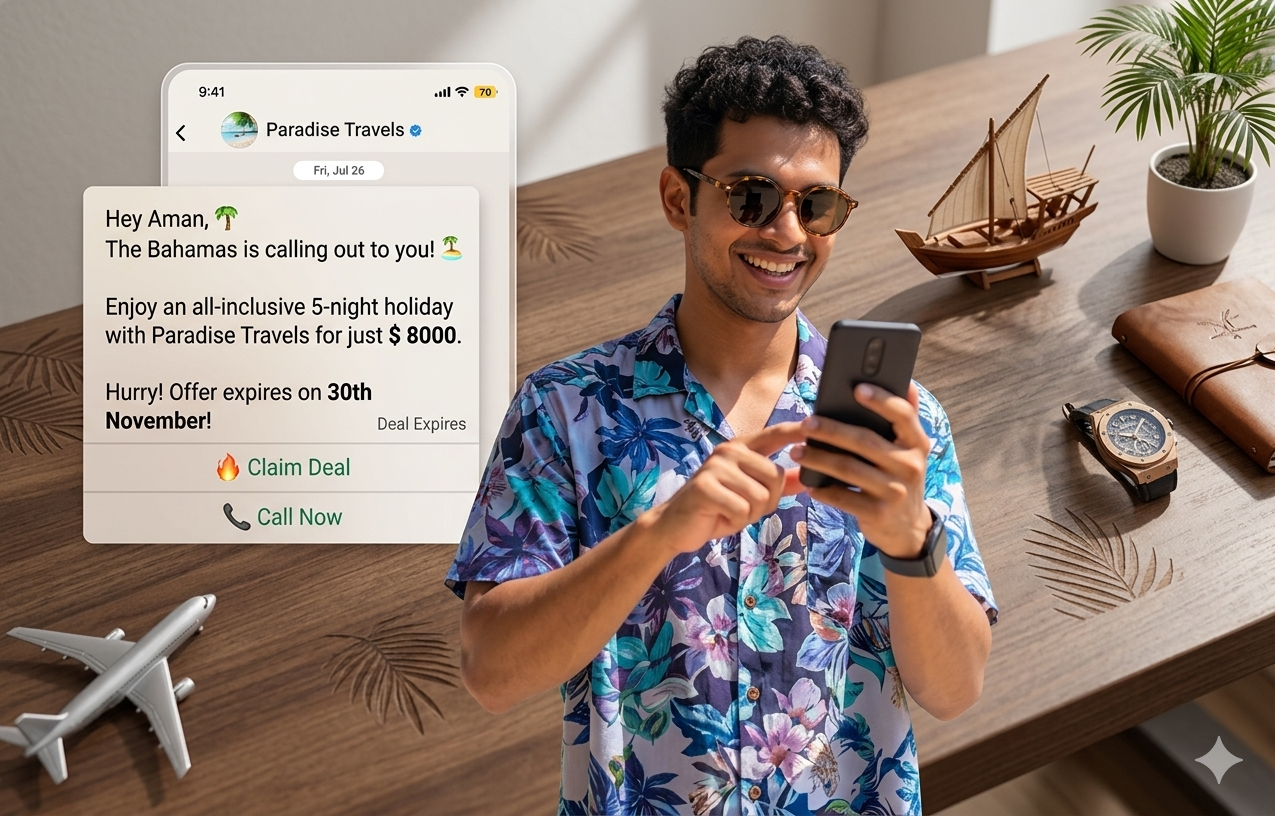
Here’s an example of a WhatsApp Broadcast message sent using the WhatsApp Business API:
Now, let’s explore how you can send broadcasts using both the WhatsApp Business App and the WhatsApp Business API.
2. How to Broadcast Messages Using WhatsApp Business AppIf you run a small, independent business, the WhatsApp Business App is an ideal option for broadcasting messages to your customers. It’s free, simple to set up, and comes with a built-in broadcasting feature.
If you don’t have a WhatsApp Business account yet, you can create one easily by following a straightforward guide.
The WhatsApp Business App allows you to send broadcasts to up to 256 unique contacts at a time. Although this number is limited, you can create multiple broadcast lists to work around it.
Sending broadcasts with the WhatsApp Business App is very straightforward. Follow these steps to create a broadcast list with up to 256 contacts and send your messages:
- Tap the three white dots on the right side of the WhatsApp Business App and select “New Broadcast.”
- Choose the contacts you want to add to your broadcast list. You can include up to 256 contacts in one list.
- Create the broadcast list by tapping the green checkmark button.
That’s all!
Tracking is simple—look for double blue ticks next to the chats of contacts who have received your broadcast.
You can now send and monitor WhatsApp Broadcast messages to contacts who have saved your number in their address book.
3. Drawbacks of Sending Broadcasts via WhatsApp Business AppWhile sending broadcasts with the WhatsApp Business App is easy, it may not be sufficient for growing your business. Here are some limitations that might make the app less suitable:
- Broadcast messages are limited to 256 contacts per list.
- The app can be used on only two devices simultaneously (one smartphone and one PC).
- There is no advanced segmentation or analysis of sent messages.
- It lacks features for chat automation, quick replies, and WhatsApp chatbot integration.
- Users who haven’t saved your number won’t receive your broadcast messages.
To reach a larger audience, you need a more powerful platform that allows you to send broadcast messages to unlimited users on WhatsApp, as promised in the title.
How can you send bulk WhatsApp broadcasts to unlimited users?The answer is the WHATSAPP BUSINESS API!
Launched around the same time as WhatsApp Business, the WhatsApp Business API is designed for medium to large businesses to personalize their communication with customers.
With the WhatsApp Business API, you can send broadcasts to unlimited unique users, automate notifications like abandoned cart reminders and payment links, communicate with multiple customers simultaneously, and offer 24/7 customer support through WhatsApp chatbots and live agents.
4. Broadcasting with WhatsApp Business APIThe WhatsApp Business API for Scalable Messaging enables businesses to send a variety of broadcast messages—such as notifications, announcements, and promotions—through a single platform.
Since the API itself is not a standalone platform, you’ll need to use a WhatsApp API-powered solution like Yugme Boom to efficiently send bulk broadcast messages on WhatsApp.
Let’s take a closer look at how Yugme Boom bulk WhatsApp sender helps you manage and send your WhatsApp broadcasts with ease.
5. WhatsApp Broadcasting on the Yugme Boom PlatformTo send WhatsApp Broadcasts using the WhatsApp Business API, start by signing up on Yugme Boom.
We’ve created a dedicated guide on how to apply for the WhatsApp Business API through Yugme Boom. Just follow the simple steps, and you can have your API access set up in about 10 minutes.
Once your WhatsApp Business API is approved, you’re ready to send bulk WhatsApp Broadcast messages using Yugme Boom.
There are two ways to send broadcast messages on WhatsApp through Yugme Booom:
method 1. Bulk WhatsApp Broadcasting via Contact Page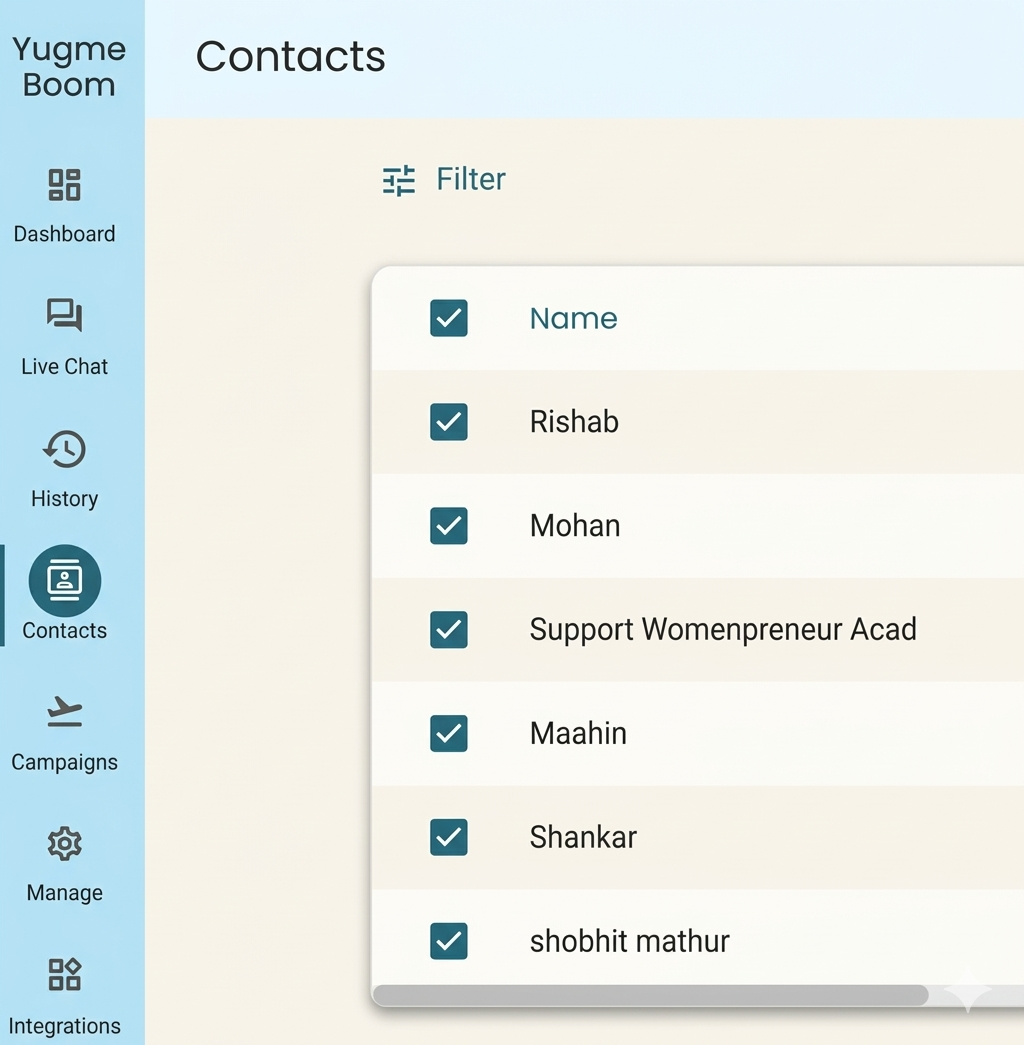
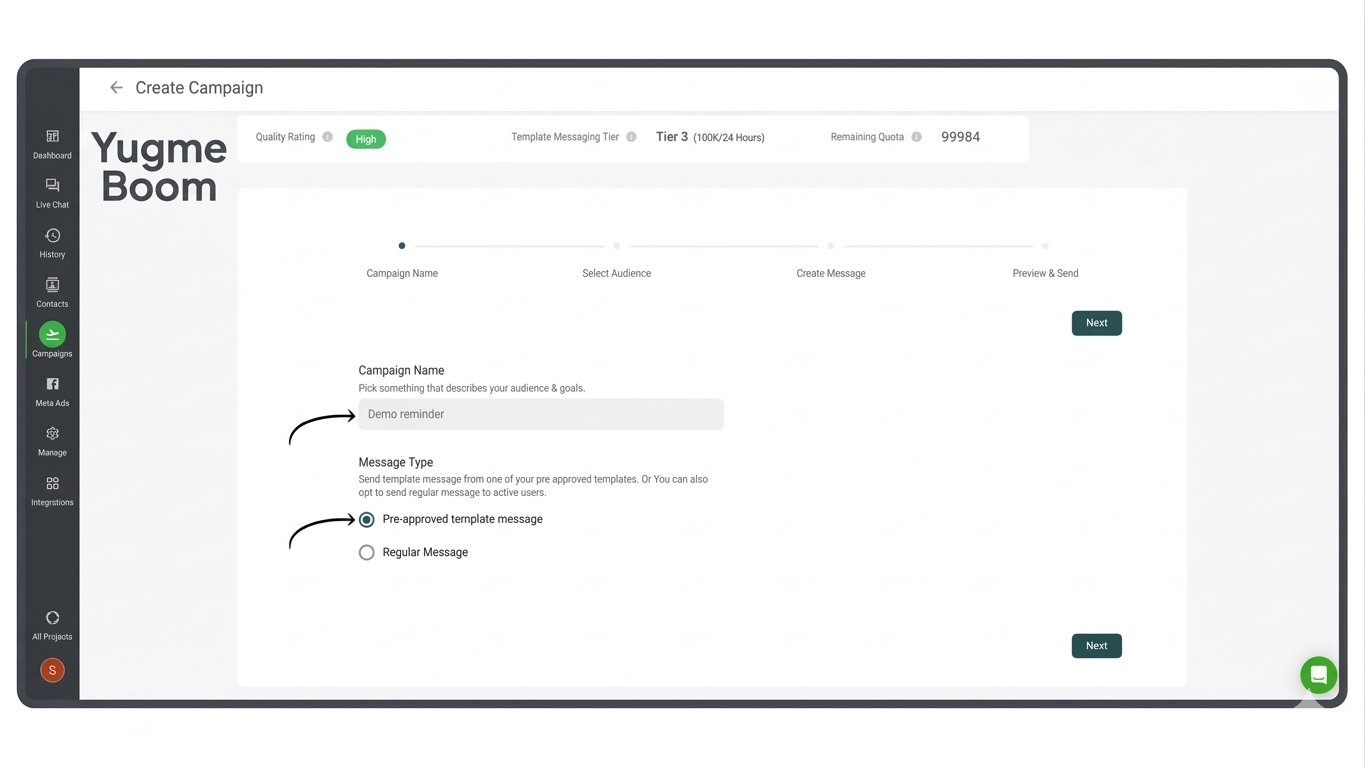
To start a WhatsApp Broadcast from the Campaigns page, click the '+ Launch' button in the top right corner and select 'Broadcast.' Then, follow these steps:
Step 1: Enter a campaign name that clearly reflects the purpose or goal of your broadcast.Choose whether to send a pre-approved template message or a regular message. Template messages require WhatsApp’s approval before sending, while regular messages can be sent to users who have interacted with you within the last 24 hours.
Fill in the message parameters by selecting relevant attributes—either by clicking the attribute button or typing them manually, similar to Method 1.
- New Feature: Use the “Generate with AI” button to have our AI WhatsApp Template Generator create your message. You can preview it and send within seconds.
Monitoring your WhatsApp Broadcast’s performance is just as important as sending it.
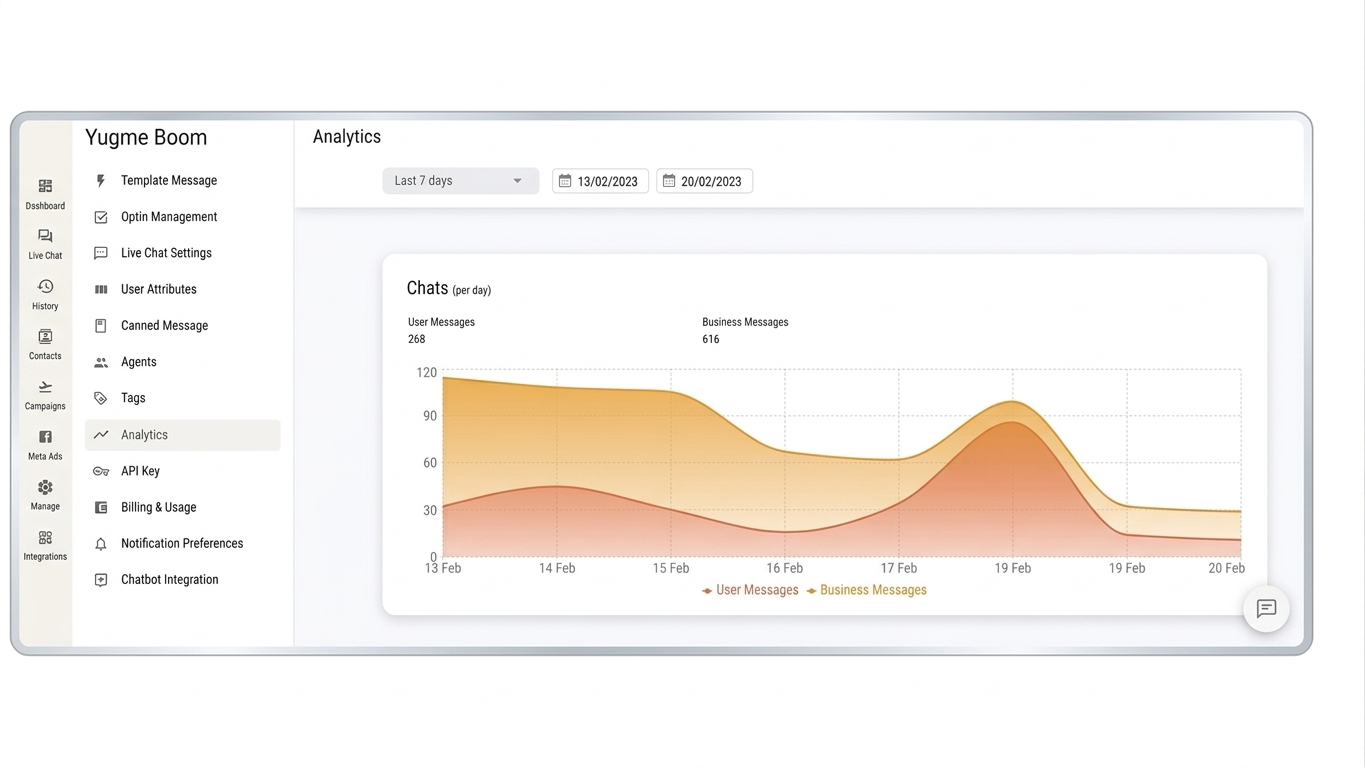
Yugme Boom user-friendly dashboard makes tracking straightforward. To view analytics:
Go to the Campaigns page and click the 'eye' icon next to any campaign. You’ll see detailed insights like those shown in the image below.
Here, you can see how many recipients the campaign successfully sent to, how many failed, were delivered, read, or enqueued.
That’s it!
Your message will reach your customers instantly.
However, you can’t immediately send messages to 100,000 unique users. You need to build credibility with WhatsApp by progressing through three trust tiers:
1st Tier: Send messages to up to 2,000 unique users per day.
2nd Tier: Increase your limit to 10,000 unique users per day.
3rd Tier: Broadcast to up to 100,000 unique users daily.
4th Tier: The highest level, allowing unlimited WhatsApp Broadcasts in one go.
7.Running WhatsApp Retargeting CampaignsNow that you understand the basics of WhatsApp Broadcasting, let’s explore Yugme Boom latest feature: Retargeting. This lets you send broadcast campaigns to specific audience segments.
For example, you can target your broadcast to:
- Users who read your previous campaign,
- Those who responded with a specific reply,
- Or users who received but didn’t open the last message.
With Yugme Boom, this is quick and effortless.
Simply go to the relevant WhatsApp Broadcast Campaign, choose your target audience (such as users who replied to a message), and send your retargeted WhatsApp Broadcast.
Below is an example of a Retargeting Campaign sent to users who clicked the CTA button in a previous WhatsApp Broadcast message.
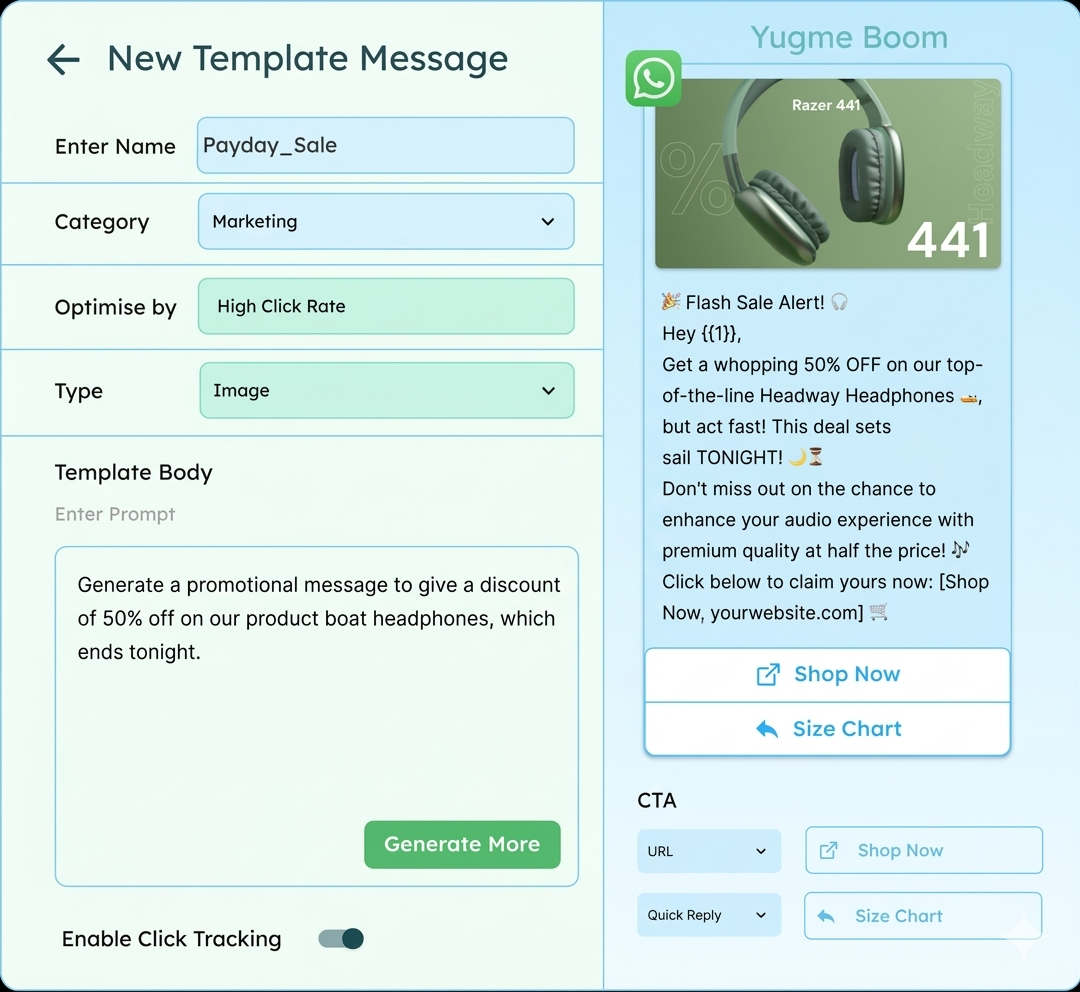
With Yugme Boom new AI WhatsApp Template Generator, you can create personalized, compliant message templates in seconds.
Here’s how it works:- Navigate to Manage → Template Messages
- Choose your category, language, and style (Normal, Poetic, Funny, or Exciting)
- Enter your prompt or select a sample
- Click 'Generate'—and your message is ready to go!
This new feature reduces the time spent drafting messages manually, speeds up your sending process, and improves delivery reliability—allowing you to focus on creative outreach and maximizing ROI.
WhatsApp Broadcasting is one of the simplest, most effective marketing techniques available. It drives sales growth and has proven valuable for many businesses.
To learn more about WhatsApp marketing strategies, check out our detailed blog.
Whether using the WhatsApp Business App or the WhatsApp Business API, you can send announcements, notifications, and compelling offers that engage your customers. In this guide, you learned:
- What WhatsApp Broadcasting is
- How to create broadcast lists using both the Business App and Business API
- How to send broadcasts via the WhatsApp Business App and the WhatsApp Business API
- How Yugme Boom empowers you to send bulk messages to thousands of customers worldwide
With the right tools and approach, WhatsApp broadcasting can become a powerful channel for your business growth.
commonly Asked Questions about WhatsApp Broadcasting
Here are answers to the most common questions about sending WhatsApp broadcast messages using the Business API.