Master Conversions with WhatsApp Retargeting Campaigns
Retargeting and follow-ups are no longer limited to just emails and SMS. Today, businesses have a more powerful way to reconnect with customers—WhatsApp retargeting.
Compared to traditional remarketing methods, WhatsApp enables brands to reach users who have already shown interest in their business. These could be people who interacted with your messages, clicked on your links, or responded to a previous campaign.
With the introduction of WhatsApp Retargeting Campaigns in the Yugme Boom app, businesses can easily segment their audience and send targeted retargeting messages in just a few clicks.
When used effectively, WhatsApp retargeting campaigns can significantly increase your conversion rates.
In this guide, you’ll learn what WhatsApp retargeting campaigns are and how to create and send them using Yugme Boom, an all-in-one WhatsApp marketing platform.
Before we continue, here are a few helpful resources you may find useful.
Imagine you want to send a broadcast message again, but only to a specific group of users—for example, people who have already read your previous campaign, those who replied with a particular response, or users who received the message but didn’t open it.
With WhatsApp Retargeting Campaigns, an exclusive feature available in Yugme Boom, you can quickly send follow-up broadcasts to these selected audiences.
This feature allows businesses to reconnect with users who have already received a WhatsApp broadcast. By targeting them based on their level of interaction or interest, you can send more relevant messages, improve the chances of conversions, and reduce overall marketing costs.
To make this possible, Yugme Boom provides detailed campaign metrics, including the percentage of messages that were sent, delivered, read, replied to, or failed. Using these insights, you can segment your audience smartly and launch retargeted broadcast campaigns with ease.
Below is how these campaign sections are displayed in the Yugme Boom app.
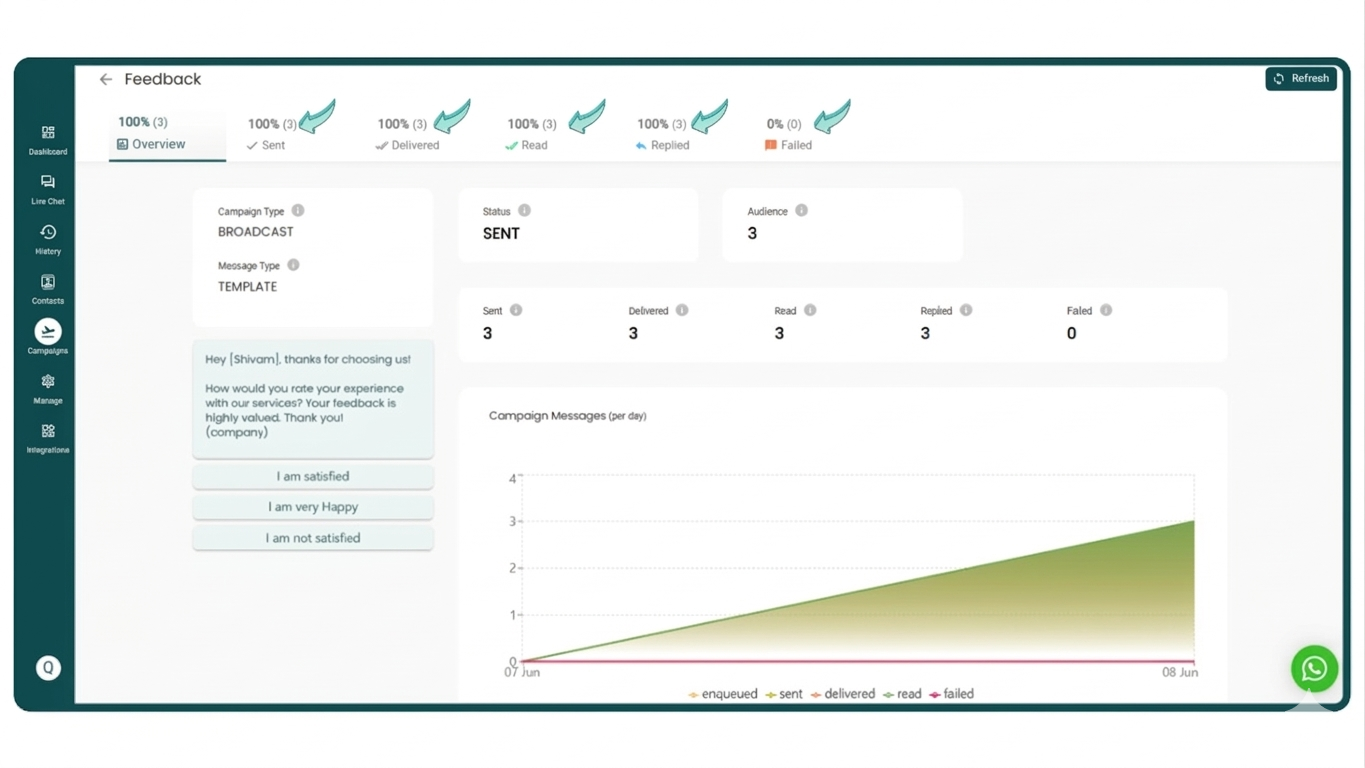
One of the biggest advantages of WhatsApp Retargeting Campaigns is that they help businesses save both time and marketing costs.
Without this feature, identifying users who have read your broadcast messages or responded to them can be a time-consuming process. It requires manually sorting through data to find the right audience for follow-up communication.
In addition, sending broadcast messages without targeting the right group often means your campaign reaches a wide and less relevant audience. This not only reduces effectiveness but can also increase your overall messaging costs.
By using WhatsApp retargeting in Yugme Boom, businesses can:
- Launch focused remarketing campaigns instead of sending messages to everyone
- Connect with high-intent leads who have already shown interest
- Re-engage potential customers who explored products or pricing but didn’t complete a purchase
- Follow up with users who opened messages but didn’t take the next step
- Recover potential sales from users who abandoned their carts
Promote upgrades, cross-sell products, or bring inactive users back into the conversation
By targeting only high-intent audience segments, you avoid unnecessary spending and achieve a much better return on investment (ROI).
The WhatsApp Retargeting Campaigns feature is available exclusively on AiSensy. The platform continuously introduces intelligent tools designed to help businesses increase sales and improve customer engagement on WhatsApp.
Use Cases 1. Detailed Campaign AnalyticsYugme Boom provides comprehensive insights into your broadcast campaigns. You can analyze campaign performance and identify the most relevant audience segments for your next broadcast—for example, users who received the message but didn’t open it, those who responded, and more.
2. Retarget Based on User ResponsesIf you send a broadcast with multiple quick-reply options, users may respond differently. With Yugme Boom smart audience segmentation, you can easily create follow-up campaigns targeting users based on the specific replies they selected.
3. Track Read and Reply RatesMonitor how many recipients have opened your broadcast message and how many have responded. This helps you understand engagement levels and plan better follow-up campaigns.
4. Check Reasons for Failed MessagesYugme Boom also lets you see why certain messages failed to deliver. For example, you can identify whether recipients are active on WhatsApp or not.
5. Reach the Most Relevant AudienceIf you want to focus on users who have already shown interest—such as those who replied to your broadcast—you can simply go to the Replied section and send a retargeting campaign directly to them. This ensures your follow-up messages reach the people most likely to convert.
Using WhatsApp Retargeting Campaigns in the Yugme Boom PlatformIn this section, we’ll explain how you can start using WhatsApp Retargeting Campaigns within the Yugme Boom app.
You can send a WhatsApp Broadcast either from the Contacts page or the Campaigns page. A detailed explanation of this process is available in the WhatsApp Broadcasting Quick Start Guide.
For now, let’s look at a simple example of sending a broadcast from the Contacts page and then creating a retargeting campaign based on that broadcast.
Step 1: Open the Contacts PageStart by navigating to the Contacts page in the Yugme Boom dashboard. From there, select or apply filters to choose the contacts you want to send your initial WhatsApp Broadcast to. This allows you to target the right audience before launching your campaign.
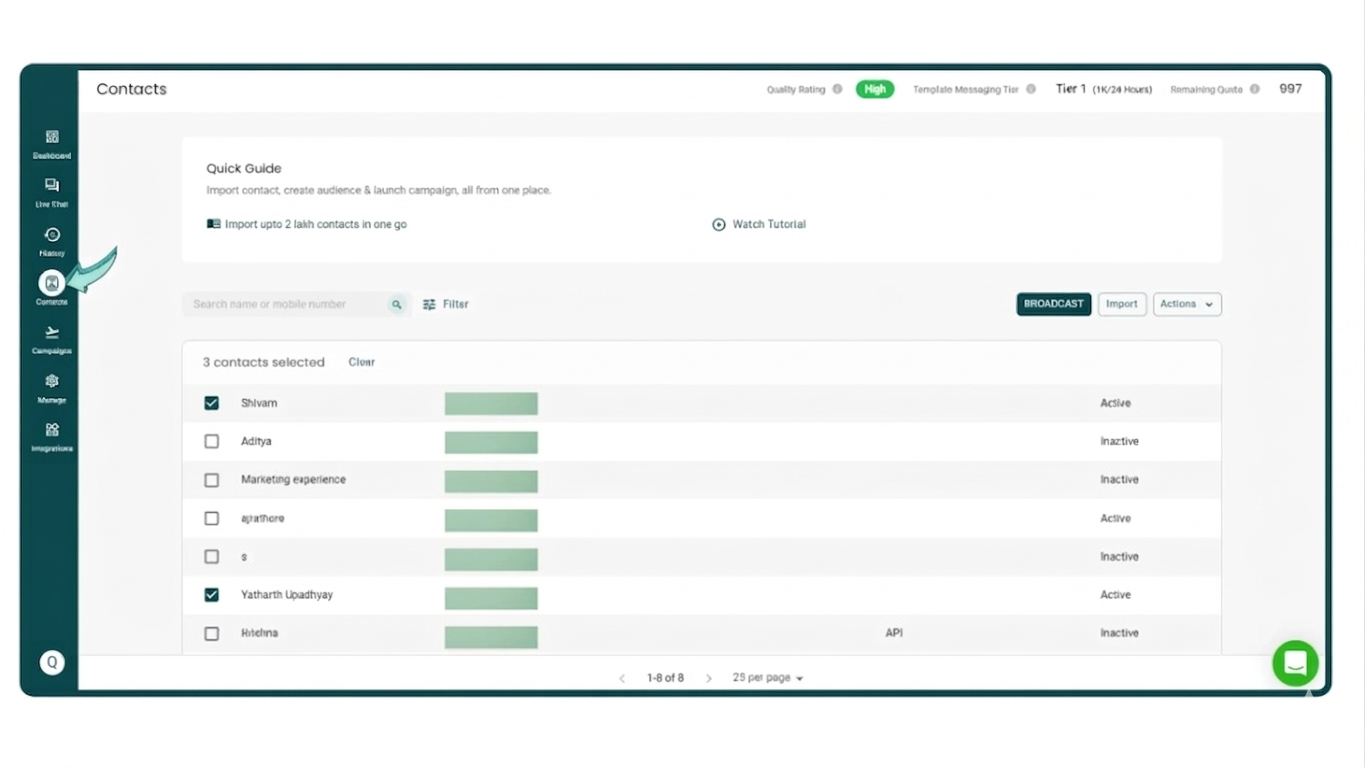
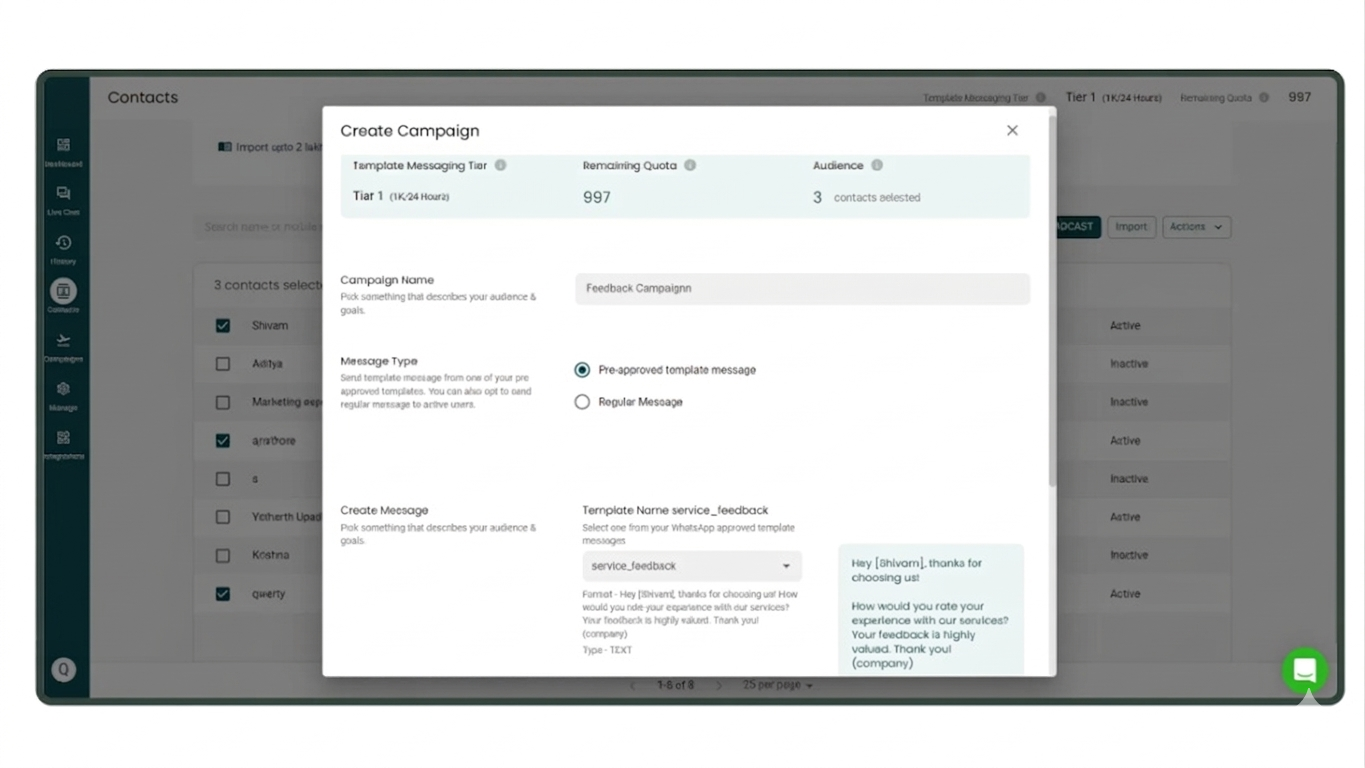
Once you’ve selected the contacts, click on the Broadcast option to start creating your campaign. Enter a suitable campaign name, select a pre-approved message template, and fill in the required parameters.
After reviewing the details, simply click “Send Now” to launch your WhatsApp Broadcast.
Next, navigate to the Campaigns page and select the most recent campaign you sent. This will allow you to view the campaign’s performance and detailed analytics.
Once you click on the campaign, a dashboard will appear displaying its analytics and results.
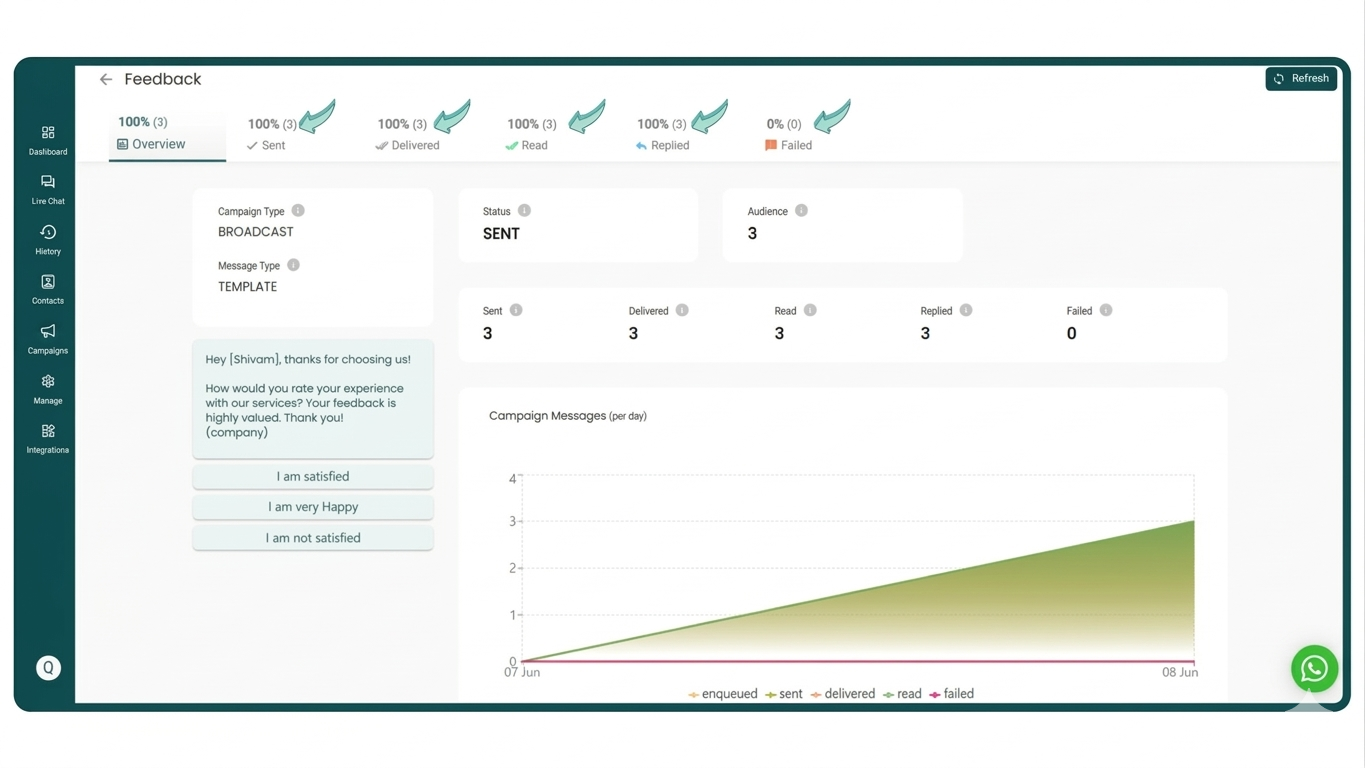
On this page, you’ll see the updated Campaigns dashboard, which provides a complete overview of your campaign performance, including the number of messages sent, delivered, read, replied to, and failed.
Now, let’s look at different scenarios where you may want to retarget a specific group of users based on their interaction with the campaign.
To begin, we’ll focus on users who responded to the message.
Imagine you want to re-engage the users to whom your messages were successfully delivered.
Within the 'Delivered' section, you have the ability to segment and retarget users based on the following criteria:
Those who opened (read) your Broadcast Message.
Those who did not open your Broadcast Message.
Both those who read and those who did not read the message.
Let’s begin by setting up a Retargeting Broadcast Campaign specifically for users who have read your message.
Retargeting Campaign for Users Who Read Your WhatsApp Broadcast
- Navigate to the 'Delivered' section.
- Check the box labeled 'has read'.
- Choose the specific individuals you wish to target with this retargeting broadcast.
- Click on the 'Broadcast' button.
Simply follow the standard procedure to launch your Retargeting WhatsApp Broadcast Campaign: name your campaign, select a pre-approved message template, and hit 'Send Now'.
Note: A default campaign name will automatically appear when you click the 'Broadcast Button', which you can customize to fit your specific needs.
Retargeting Broadcast Campaign for Users Who Did Not Read Your WhatsApp BroadcastNow, imagine you want to reach out to those users who missed your original Broadcast message.
Here is how you can do it:- Go to the 'Delivered' section.
- Tick the checkbox for 'did not read'.
- Pick the names of the people you want to include in this retargeting broadcast.
- Press the 'Broadcast' button.
Follow the same steps to send your campaign: add a Campaign Name, choose a pre-approved template, and click 'Send Now'.
Send Retargeting Broadcast Campaign to All Users (Both Read and Did Not Read)Now, suppose you want to retarget your entire audience—specifically, users who either read or did not read your Broadcast message.
Here is the process to follow:- Navigate to the 'Delivered' section.
- Tick the checkbox labeled 'did not read'.
- Choose the names of the individuals you wish to include in this Retargeting WhatsApp Broadcast.
- Click the 'Broadcast' button.
Follow the standard procedure to launch your Retargeting WhatsApp Broadcast Campaign: provide a Campaign Name, select a pre-approved message template, and click 'Send Now'.
(2) Use Case Scenario 2: Retargeting Users Based on Replies (Replied, Did Not Reply, or Both)Let's look at how to retarget users who have read your Broadcast message. You have the option to retarget users based on the following actions:
- They read and replied.
- They read but did not reply.
- Both replied and did not reply.
Now, imagine you want to retarget those users who replied to your Broadcast message.
Here is how to do it:- Go to the 'Read' section.
- Tick the checkbox for 'has replied'.
- Select the names of the people you want to send the Retargeting WhatsApp Broadcast to.
- Click the 'Broadcast' button.
Follow the same routine to send your Retargeting WhatsApp Broadcast Campaign: Add a Campaign Name, choose a pre-approved message template, and click 'Send Now'.
Now, suppose you want to retarget those users who did not reply to your Broadcast message.
Here is how to do it:- Navigate to the 'Read' section.
- Tick the checkbox for 'not replied'.
- Select the names of the people you want to send the Retargeting WhatsApp Broadcast to.
- Click the 'Broadcast' button.
Follow the same steps to send your Retargeting WhatsApp Broadcast Campaign: Add a Campaign Name, choose a pre-approved message template, and click 'Send Now'.
Now, imagine you want to retarget all the users—this includes both those who replied and those who didn't.
Here is how to do it:- Go to the 'Read' section.
- Tick both checkboxes: 'has replied' and 'not replied'.
- Select the names of the people you want to send the Retargeting WhatsApp Broadcast to.
- Click the 'Broadcast' button.
Follow the same process to send your Retargeting WhatsApp Broadcast Campaign: Add a Campaign Name, choose a pre-approved message template, and click 'Send Now'.
(3) Use Case Scenario 3: Retargeting Users Who Replied with a Specific MessageConsider a scenario where you want to retarget users based on a specific reply, such as a Quick Reply like 'I am satisfied'.
You have the option to retarget users who sent a particular reply:- Within 1 hour of receiving the Broadcast
- Within 3 hours of receiving the Broadcast
- Within 24 hours of receiving the Broadcast
Now, let's assume you want to retarget users who replied within 1 hour of the Broadcast being sent.
Here is how to do it:- Navigate to the 'Replied' section.
- In the 'Replied in' filter, select '1 Hour' to display users who responded within one hour of the WhatsApp Broadcast.
- Choose the specific reply you want to target. For instance, we targeted people who replied with 'Happy Diwali'.
- Pick the names of the people you want to include in the Retargeting WhatsApp Broadcast.
- Click the 'Broadcast' button.
Follow the standard procedure to send your Retargeting WhatsApp Broadcast Campaign: Add a Campaign Name, choose a pre-approved message template, and click 'Send Now'.
Now, suppose you want to retarget users who replied within 3 hours of the Broadcast being sent.
Here is how to do it:- Go to the 'Replied' section.
- In the 'Replied in' filter, select '3 Hours' to view users who responded within that timeframe after the WhatsApp Broadcast was sent.
- Choose the specific reply you want to target. For instance, we targeted people who replied with 'Happy Diwali'.
- Select the names of the individuals you want to send the Retargeting WhatsApp Broadcast to.
- Click the 'Broadcast' button.
Follow the same routine to send your Retargeting WhatsApp Broadcast Campaign: Add a Campaign Name, choose a pre-approved message template, and click 'Send Now'.
Now, suppose you want to retarget users who replied within 24 hours of receiving your broadcast message.
Follow these steps:- Go to the Replied section.
- In the “Replied In” filter, select “24 Hours” to display users who responded within 24 hours of the broadcast.
- Choose the specific reply you want to target. In this example, the users selected are those who replied with “Happy Diwali.”
- Select the contacts you want to include in the retargeting broadcast.
- Click the Broadcast button.
Then follow the same process to send the retargeting campaign—enter the campaign name, choose a pre-approved message template, and click “Send Now.”
Use Case Scenario 4 – Retargeting Users for Whom the WhatsApp Broadcast FailedIn some situations, your WhatsApp Broadcast may fail to reach certain users. You can retarget these users based on whether their phone numbers are active on WhatsApp or not.
Retargeting Users Who Are on WhatsApp but Didn’t Receive the BroadcastOne common reason a broadcast fails is that the phone number may not be registered on WhatsApp. However, Yugme Boom generally ensures successful delivery for numbers that are active on WhatsApp. In testing, broadcasts sent to users who were on WhatsApp were delivered successfully without failures.
In rare cases where the message fails to send even though the user is on WhatsApp, you can retarget them by
following these steps:
- Go to the Failed section.
- In the Phone Number filter, select “On WhatsApp” to view users whose messages failed even though they are active on WhatsApp.
- Select the contacts you want to retarget.
- Click the Broadcast button.
Next, continue with the usual process—enter the campaign name, select a pre-approved message template, and click “Send Now.”
You might wonder why you should use conversation credits to send a broadcast to users who are not on WhatsApp.
When you send a broadcast to such numbers, WhatsApp notifies them that they have received a message and encourages them to download the app. This can help bring those users onto WhatsApp so you can connect with them later.
Steps to retarget these users:- Go to the Failed section.
- In the Phone Number filter, select “Not on WhatsApp.” This will display users whose broadcast messages failed because they are not currently on WhatsApp.
- Select the contacts you want to target with the retargeting broadcast.
- Click the Broadcast button.
Then follow the same process to send the campaign—enter the campaign name, choose a pre-approved message template, and click “Send Now.”
Best Practices for WhatsApp RetargetingTo create meaningful conversations and improve conversions on WhatsApp, follow these important practices:
Personalize your messagesInclude details such as the customer’s name, the products they viewed, or their previous orders to make the conversation more relevant.
Send messages at the right timeFor example, cart reminder messages work best when sent 15–30 minutes after cart abandonment, while the intent to purchase is still strong.
Use urgency carefullyLimited-time offers or expiring discounts can encourage quick action, but they should be used thoughtfully to avoid overwhelming customers.
Add visual elementsUse images, product catalogs, and quick-reply buttons to make messages more engaging and easier for users to respond to.
Combine automation with human supportAutomation can handle initial follow-ups efficiently, but more complex queries should be transferred to human agents to keep conversations natural.
Test and optimize regularlyUse A/B testing to experiment with different timings, tones, and offers. Monitor results to understand what works best for each audience segment.
Why Choose Yugme Boom for WhatsApp RetargetingYugme Boom is an official WhatsApp Business API provider trusted by over 150,000+ businesses, helping them generate 25–40% more revenue through WhatsApp.
With Yugme Boom, businesses can:
- Send WhatsApp broadcasts to unlimited opted-in users.
- Deploy AI-powered agents on WhatsApp to capture leads, recommend products, qualify prospects, and automate tasks.
- Provide live chat support across unlimited devices, allowing multiple agents to respond using the same phone number.
- Manage conversations efficiently with a built-in WhatsApp CRM.
- Assign chats to multiple agents for better ownership and collaboration.
- Run retargeting campaigns to reconnect with users and optimize marketing budgets.
- Monitor campaign performance and conversions through real-time analytics.
FAQs Master Conversions with WhatsApp Retargeting Campaigns
These FAQs answer common questions about WhatsApp Retargeting, including what it is, how it works, its purpose, different ways to retarget users using Yugme Boom, and how it helps businesses improve conversions.
WhatsApp Retargeting Campaigns offer great potential for improving engagement and conversions.
This powerful feature allows you to reconnect with specific audience segments and is exclusively available on Yugme Boom. The platform continuously introduces smart tools designed to help businesses grow their sales through WhatsApp.
Get started with the Yugme Boom app today and begin running targeted WhatsApp retargeting campaigns.
If you’re new to Yugme Boom, sign up now to apply for the Free WhatsApp Business API