WhatsApp Cloud API: Everything You Need to Know (2026)
Facebook has announced the global rollout of WhatsApp Cloud API, making WhatsApp accessible to businesses worldwide. This new offering allows companies to build and customize their WhatsApp experiences more efficiently.
Previously, businesses had to go through Business Service Providers (BSPs) to access the WhatsApp Business API. Now, with WhatsApp Cloud API, businesses can receive instant approval directly from Facebook—completely free of charge.
This blog serves as a comprehensive guide to understanding what WhatsApp Cloud API is, its features and benefits, and how you can get started with it through yugme Boom in just 10 minutes
Overview
1. Understand WhatsApp Cloud API?
2. How does On-premise WhatsApp Business API differ from WhatsApp Cloud API?
3. Key Features of WhatsApp Cloud API with Yugme Boom
4. Advantages of Using WhatsApp Cloud API
5. How to Obtain WhatsApp Cloud API for Free
6.Impact on Businesses Currently Using WhatsApp Business API
7. How New Applicants Benefit
8. Is WhatsApp Cloud API Free?
9. Key Limitations of WhatsApp Cloud API
The WhatsApp Cloud API is the cloud-based version of the WhatsApp Business API. It empowers businesses and developers to build directly on top of WhatsApp, allowing them to customize their interactions and respond to customers with speed and ease. The process is much smoother now, as businesses can get direct approval for the Cloud API from Facebook.
With WhatsApp Cloud APIs, any business can:
- Access the service effortlessly.
- Build custom solutions on top of WhatsApp.
- Engage with customers seamlessly.
Historically, only WhatsApp Partners and Business Service Providers (BSPs) had the privilege of building on WhatsApp using these APIs. Businesses had to rely on official BSPs just to get approved, as Facebook did not provide direct access to the API at that time.
Facebook has since removed this barrier, allowing businesses to create and approve their WhatsApp Cloud API accounts directly.
Note: Setting up a WhatsApp Cloud API account is straightforward—you can get it done in about 10 minutes (we will walk through the process later on).
In just a few minutes, this tool enables businesses and developers to build customized experiences and respond to customers quickly. Since the best business experiences meet people where they already are, opening this technology to businesses everywhere is a significant step forward.
Let’s break down the key factors that differentiate the on-premise WhatsApp Business API from the WhatsApp Cloud API:
1. Speed of AccessWith the WhatsApp Cloud API, Facebook provides direct access in a matter of minutes. In contrast, the on-premise version relies on Business Service Providers (BSPs) acting as intermediaries to get businesses approved, which can slow down the process.
2. Hosting ExpensesOn-premise API setups often involve hosting charges from BSPs, which can make tracking cloud infrastructure costs difficult for businesses. With the Cloud API, Facebook absorbs all hosting and access costs, eliminating that financial overhead.
3. Approval ProcessFacebook grants direct approval for the WhatsApp Cloud API. For the on-premise version, businesses must work through BSPs to gain access.
4. Maintenance and UpgradesFacebook handles all maintenance costs and updates for the Cloud API. On the other hand, on-premise implementations require BSPs to manually roll out updates, which can require more hands-on management.
Aside from these operational differences, the core functionality of the WhatsApp Business API and WhatsApp Cloud API remains largely the same.
Now, let’s look at the specific features you get with the WhatsApp Cloud API.
3. Key Features of WhatsApp Cloud API with Yugme BoomSimilar to the on-premise version, utilizing the WhatsApp Cloud API requires a platform like Yugme Boom. Here is how you can leverage the WhatsApp Cloud API through Yugme Boom:
- WhatsApp Bulk Broadcasting: Send messages to thousands of users in a single campaign.
- Seamless Integrations: Connect with over 2,000 CRMs and e-commerce platforms to automate notifications for events like order updates, shipping, and payment confirmations.
- Live Chat Support: Provide live human customer support across multiple devices simultaneously.
- Rich Media Templates: Send template messages featuring text, images, audio, and video.
- Interactive Elements: Enhance your messages with lists, Quick Replies, and CTA buttons.
- Green Tick Verification: Get your business officially verified with the Green Tick at no extra cost.
These are the core features available when using a platform like Yugme Boom with the Cloud API. However, the advantages extend beyond just functionality.
4. Advantages of Using WhatsApp Cloud APIThe WhatsApp Cloud API offers several distinct benefits:
- Lightning-Fast Approval: Facebook now grants direct access to the Business API to businesses globally in a matter of minutes. You no longer need a BSP to get approved—only to access a platform for using the API.
- Zero Cost for Access: Facebook has removed the cost barrier, allowing businesses to get approved for the WhatsApp Business API without paying anything.
- Instant Updates: Because you have direct access via Cloud APIs, you receive new features and updates immediately as they are released, without waiting for manual rollouts.
You can get started with the WhatsApp Cloud API for free using Yugme Boom!
Yugme Boom simplifies the process by helping you acquire the API and providing a robust platform to integrate it, allowing you to connect with users at scale. You don't even need a pre-approved Facebook Business Manager account; an active Facebook account and a WhatsApp number are all you need.
Here is the step-by-step process to apply for the WhatsApp Cloud API with Yugme Boom:
1. Sign Up on the Yugme Boom App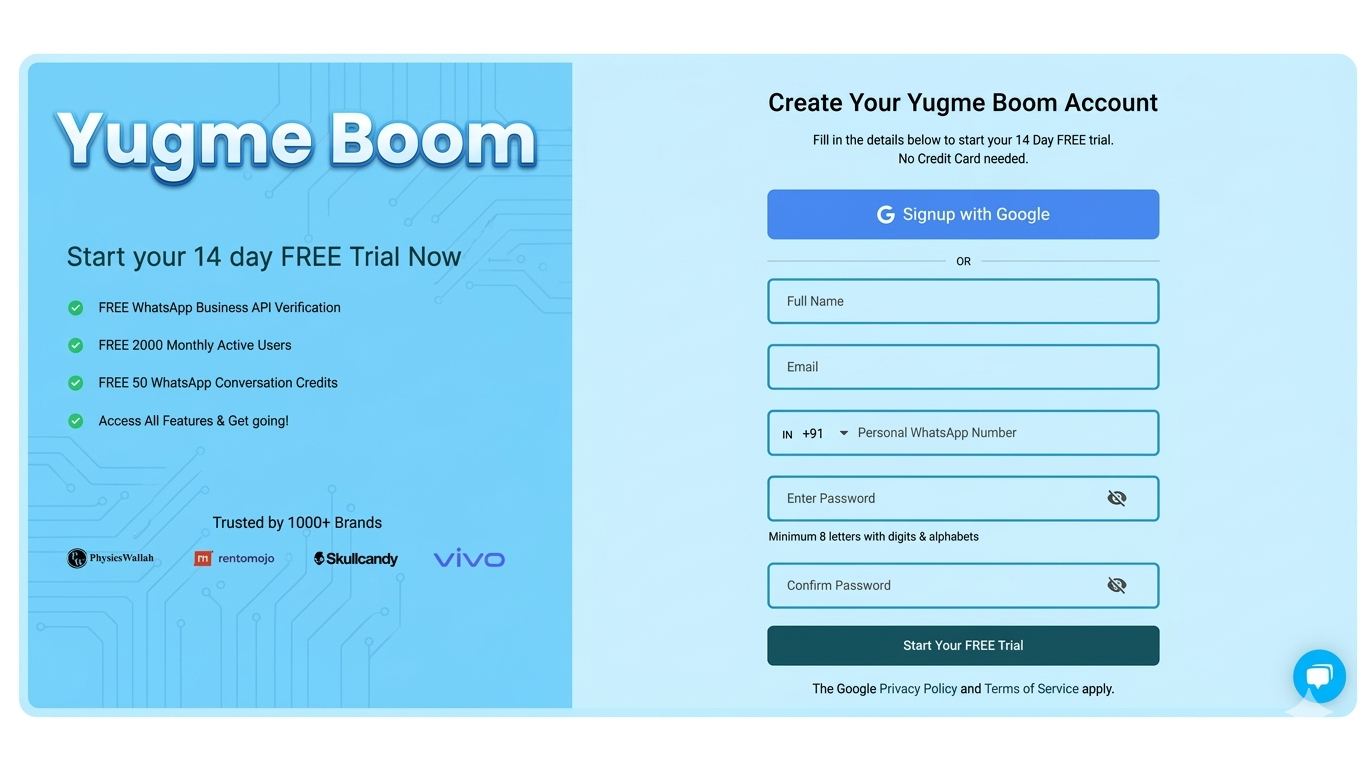
Start by visiting the Yugme Boom Signup Page. You can register quickly using your Google account, or fill out the form if you prefer to use a different business email address.
2. Verify with OTP (For Form Signups Only)If you registered via the form, you will receive an OTP on your registered mobile number. Enter the code and click 'Submit' to move forward.
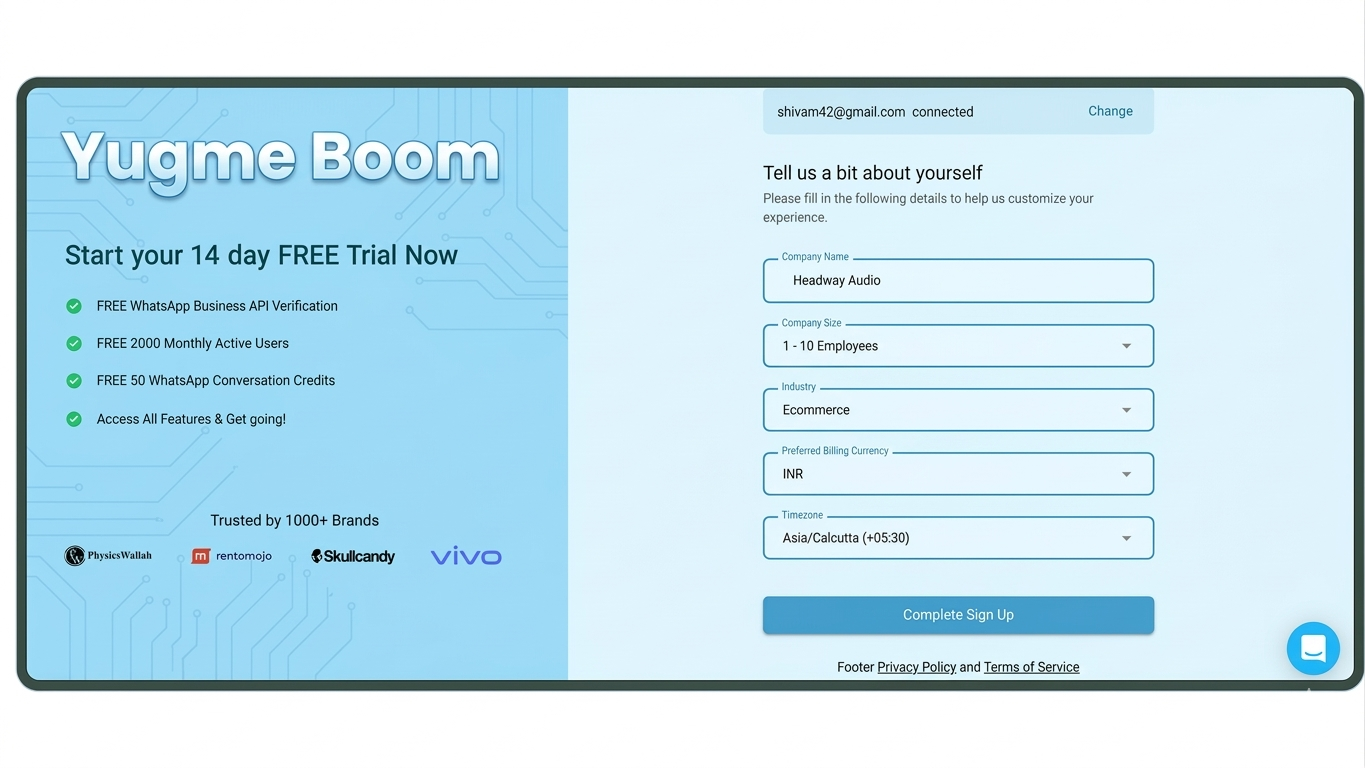
Provide essential business information such as your company name, size, industry, billing currency, and timezone. This allows us to customize your experience. Once completed, click the "Complete Sign Up" button.
4. Activate Your 14-Day FREE TrialYou now have access to a 14-Day FREE Trial, which includes:
- Free WhatsApp Cloud API Verification.
- Support for 2,000 Monthly Active Users.
- 50 WhatsApp Conversation Credits to test the platform.
- Full access to all features.
Click the “Continue with Facebook” button to begin the WhatsApp Business API procurement process. Ensure you have admin access to your Facebook Business Manager account to proceed.
Note: Your Facebook Business Manager Account must be verified to gain complete access to the WhatsApp Cloud API. You can handle the verification simultaneously while applying or complete it after procurement.
Clicking the button will redirect you to the Meta window where you can apply for the WhatsApp Business API. Click 'Get started' to begin filling out the procurement application.
8. Link Your Facebook Account with Yugme BoomOn the next screen, review the permissions listed and click 'Continue' to connect your Facebook account with Yugme Boom.
7. Choose Your Business AccountSelect the Facebook Business Account you wish to associate with your WhatsApp Business API Account.
Reminder: You must verify this Facebook Business Account to enjoy complete access to the WhatsApp Business API. After selecting your account, click 'Continue'.
10. Submit Legal Business DetailsCarefully complete the WhatsApp Cloud API Account form with the following details:
- Legal Company Name
- Business Phone Number (This can be different from the number used for the API).
- Business Website
- Business Email
Click 'Continue' to proceed.
Note: This window might not appear for all accounts. If it doesn't, don't worry—it will not affect your approval chances. 8. Enter Business Address InformationProvide official details regarding your company headquarters and location, then press 'Continue'.
Note: Similar to the previous step, this window may not appear for every account.
9. Set Up Your WhatsApp Business AccountNext, create a new WhatsApp Business Account or select an existing one.
Note: This is an internal name for your account within Facebook Business Manager, not the Display Name visible to end-users. To create a new account, enter your Business Name and Timezone, then click 'Continue'. 10. Configure Your Business ProfileThe Display Name is what your users will see. If this name differs from your company's Legal Name, you must provide a relevant business website to establish the connection between the two. Be sure to follow the specific rules outlined in the WhatsApp Display Name Guide.
14. Select Category and DescriptionChoose the category most relevant to your business and add a suitable description (optional). This description will be visible to customers when they view your profile and can be updated at any time. Once done, proceed to the final step.
11. Verify Your Phone NumberFinally, enter the phone number you wish to use for the WhatsApp Business API. Ensure the number is active and capable of receiving a verification code via SMS or voice call. After entering the number, click 'Send Code'. Input the code you receive and click 'Submit'.
16. Application Submitted for ReviewCongratulations!
If you see the confirmation screen, you have successfully applied for the WhatsApp Cloud API with Yugme Boom. You are now one step closer to growing your business. Most reviews are completed instantly (within 10 minutes), though Display Name approval can occasionally take up to 3-4 hours.
Breaking Down WhatsApp Cloud API PricingThere is a common myth circulating that the WhatsApp Cloud API is entirely free. In reality, only accessing the API is free. Beyond that, you are still responsible for conversation charges, as well as the cost of a platform like Yugme Boom to effectively utilize the API.
Simply put, WhatsApp Cloud API pricing is based on per-message charges for template messages. The specific rate depends on the recipient’s country and the template category, as detailed in the table below:
| Category Type | Usage Description | Cost per Message (INR) |
|---|---|---|
Marketing | Covers promotions, offers, product updates, and reminders. | ₹1.09 per message. |
Utility | ncludes order updates, payment reminders, and delivery information. | ₹0.145 per message. |
Authentication | Used for OTPs, account logins, and verifications. | ₹0.145 per message. |
Service | Applies to support messages replied to within 24 hours of the user’s message. | FREE. |
For messaging users located outside India, please refer to the country-wise WhatsApp conversation pricing.
Note: Service messages and Utility messages delivered within an active customer service window remain free. To understand the customer service window and pricing structure better, check out our detailed guide: WhatsApp API Pricing Explained - Updated January 1, 2026.
6. Impact on Businesses Currently Using WhatsApp Business APIIf you already have an approved WhatsApp Business API account, the Cloud API changes nothing for your current operations. While you have the option to switch, it offers little benefit if your existing setup is already running smoothly.
The WhatsApp Cloud API is primarily designed to make the Business API more accessible to businesses globally. If you are already using the API with a platform like Yugme Boom, you can continue business as usual. You retain access to all standard features under one unified platform.
How New Applicants BenefitFor businesses new to the WhatsApp Business API, the Cloud API significantly streamlines the entry process. You can now get your account approved for free within minutes.
Previously, getting approved required a verified Facebook Business Manager Account. Now, you can apply for and receive approval without it. However, keep in mind that unverified accounts have limited access. We strongly recommend verifying your Facebook Business Manager alongside your application to unlock full functionality.
Is WhatsApp Cloud API Free?You can obtain direct access to the WhatsApp Cloud API for free from Facebook. However, the API is just the infrastructure; you still need a platform to actually communicate with your users. Yugme Boom bridges this gap by providing the necessary platform to utilize the API effectively.
Select partners, including Yugme Boom, offer free access to the WhatsApp Cloud API. With Yugme Boom, you can:
Broadcast messages to unlimited users simultaneously.
Automate notifications for orders, deliveries, and abandoned carts via integrations.
Automate customer support using WhatsApp Chatbots.
Provide multi-agent live chat support across multiple devices.
Ready to get started? Sign up with Yugme Boom today to access the WhatsApp Business API for free.
Key Limitations of WhatsApp Cloud APIThe primary limitation is that Facebook does not provide a user interface to operate the Cloud API. To utilize its potential, you must connect your account to a third-party platform like Yugme Boom.
Another constraint involves number compatibility: you cannot use the same WhatsApp number for both on-premise and Cloud APIs simultaneously. However, you can transfer your existing phone number from an on-premise setup to the Cloud API if you choose to switch architectures. A number must be registered exclusively with one or the other.
Frequently Asked Questions About WhatsApp Cloud API
This section addresses the most common questions surrounding the WhatsApp Cloud API, clarifying misconceptions about its cost, feature availability, and how it compares to the on-premise version. It concludes with a forward-looking perspective on how this launch aligns with Meta's vision for the future of business communication.